Attendance Sheet in Excel: Free Template for India (2026)
Payal focuses on leave management and compliance workflows for Indian businesses.
TL;DR: Download the monthly attendance sheet below as Excel or PDF, free and without giving an email address. The Excel file already carries the formulas, so the present, absent, leave, and payable-day totals fill themselves as you type the codes.
An attendance sheet records who was at work on each day of the month. Indian businesses use it for salary calculation, leave tracking, and the argument that follows when someone disputes their days. Most templates you find online are built for American workplaces: they have no casual leave column, no sick leave column, and no earned leave column, so the leave register ends up living somewhere else and the two never agree at month end.
This one is built for India.
Download the attendance sheet
| Template | Best for | Download |
|---|---|---|
| Monthly attendance (Excel) | Whole month, totals calculated for you | Download .xlsx |
| Monthly attendance (PDF) | Printing and marking by hand, A4 landscape | Download .pdf |
| Daily attendance (Excel) | One page per day, with in and out times | Download .xlsx |
| Daily attendance (PDF) | Printing for a register or a notice board | Download .pdf |
No email required, no watermark, no sign-up. The Excel file holds 20 employees and 31 days; copy the last row down for a bigger team.
What is already built in:
- Columns for casual leave, sick leave, and earned leave, marked separately so the sheet reconciles against your leave register.
- A payable-days column that adds full days, half days at 0.5, paid leave, weekly offs, and holidays.
- An attendance percentage that fills in once you enter the month’s total working days in the highlighted cell.
- Frozen headers, so the employee names stay on screen when you scroll to day 28.
Which one do you want? Use the monthly sheet if you are tracking a whole month for salaried staff, which is what most offices and shops need. Use the daily attendance sheet if you want one page per day with in and out times, which suits a register at a front desk. Use the muster roll if you pay workers by days worked rather than a monthly salary.
What belongs on a monthly attendance sheet
A good attendance sheet answers four questions without a calculator:
- Who worked which day of the month
- Who was on approved leave, and on which kind of leave
- Who was absent without approval, which is what costs them pay
- How many days each person is owed for
That means your sheet needs these columns:
| Column | Purpose | Example |
|---|---|---|
| Emp code | Short internal ID | EMP001 |
| Name | Full name | Priya Reddy |
| Department | Team or function | Sales |
| Day 1 to Day 31 | One column per calendar day | P / A / HD / CL / WO |
| Present | Count of P marks | 21 |
| Half day | Count of HD marks, paid at half a day | 2 |
| CL, SL, EL | Casual, sick, and earned leave, counted separately | 1 / 0 / 1 |
| Weekly off | Count of WO marks | 4 |
| Holiday | Count of H marks | 1 |
| Absent | Count of A marks, the loss-of-pay days | 1 |
| Payable days | P + (HD x 0.5) + CL + SL + EL + WO + H | 29 |
| Attendance % | (P + HD x 0.5) / total working days in the month | 85% |
Shaded weekends, holidays in a different colour, and a legend at the top explaining each code. That is nearly every Indian SMB attendance sheet in one format.
Build it yourself in Excel or Google Sheets
The download above already does this. If you would rather build your own, or you want to understand what the formulas do before you trust them, here is the whole thing.
Paste this header row into row 1 of a blank sheet, then add one row per employee below it.
Emp Code | Name | Department | 1 | 2 | 3 | ... | 31 | Present | Half day | CL | SL | EL | Weekly off | Holiday | Absent | Payable days | Attendance %Employee data starts at row 2, and the day columns run D to AH. The summary formulas for row 2:
- Present (
AI2):=COUNTIF(D2:AH2,"P") - Half day (
AJ2):=COUNTIF(D2:AH2,"HD") - Casual leave (
AK2):=COUNTIF(D2:AH2,"CL") - Sick leave (
AL2):=COUNTIF(D2:AH2,"SL") - Earned leave (
AM2):=COUNTIF(D2:AH2,"EL") - Weekly off (
AN2):=COUNTIF(D2:AH2,"WO") - Holiday (
AO2):=COUNTIF(D2:AH2,"H") - Absent (
AP2):=COUNTIF(D2:AH2,"A") - Payable days (
AQ2):=AI2+(AJ2*0.5)+AK2+AL2+AM2+AN2+AO2 - Attendance % (
AR2):=IF(N($D$4)=0,"",(AI2+AJ2*0.5)/$D$4), whereD4holds the month’s total working days
Select AI2:AR2 and drag the fill handle down to copy the formulas to every employee row.
Payable days and attendance percentage are not the same number. Payable days is what you owe: worked days, paid leave, weekly offs, and holidays all count. Attendance percentage measures time actually at work, so it counts present days and half days only. Divide payable days by working days instead and the figure goes above 100% in any month with a holiday, which is the error that makes an owner distrust the whole sheet.
Legend codes to put at the top of the sheet:
- P = Present
- A = Absent, treated as loss of pay
- HD = Half day
- CL = Casual leave
- SL = Sick leave
- EL = Earned leave
- WO = Weekly off
- H = Holiday
Two formatting habits are worth the minute they cost. Shade the weekend columns grey and the holiday columns light red, so a wrong mark is visible without reading it. Then add a conditional format that turns any Attendance % below 85% red.
Why leave gets three columns and not one. Casual, sick, and earned leave carry different balances, different approval rules, and different encashment treatment at exit. Collapse them into a single LV code and you have to reopen the leave register to answer the only question anyone asks at month end, which is how many of each type this person has left. Marking them separately costs one extra keystroke and settles that question inside the sheet.
How Indian businesses actually fill the sheet
Three patterns are common:
- Owner marks the sheet from memory at end of day. Works for a 5-person shop. Breaks at 15 people.
- A manager collects entries from a paper register and types them in every morning. Takes 30-45 minutes daily. Late entries get missed.
- Each employee fills their own row at the end of their shift. Faster, but encourages buddy punching (one person filling for another).
All three depend on someone remembering to update the sheet. The first time an owner goes on leave or a manager quits, a week of data disappears.
Where a simple attendance sheet stops scaling
For 5-8 employees in one location, a monthly attendance sheet works. The problems start when any of these are true:
- Two or more locations. Now you maintain one sheet per store or site. Combining them for payroll takes hours.
- Field staff or delivery teams. You have no way to verify they actually reached the client site. The sheet trusts whatever they typed.
- Shift work or multiple check-ins per day. A single P, A, or HD code cannot represent a lunch break or a second shift.
- Salary disputes. Someone says they came 27 days, the sheet shows 24. You cannot prove either number. Without a GPS stamp or a timestamped photo, the argument drags into next month.
- CA asks for attendance data every month. Now you are also formatting the sheet for export, removing staff who exited, and renaming columns.
- Someone forgot to update the sheet for a week. Reconstruction from memory is unreliable. Backfill errors show up six months later in an audit.
If you run more than one location or have more than 15 employees, the sheet is no longer the tool. It is a bottleneck.
What replaces a sheet for Indian SMBs
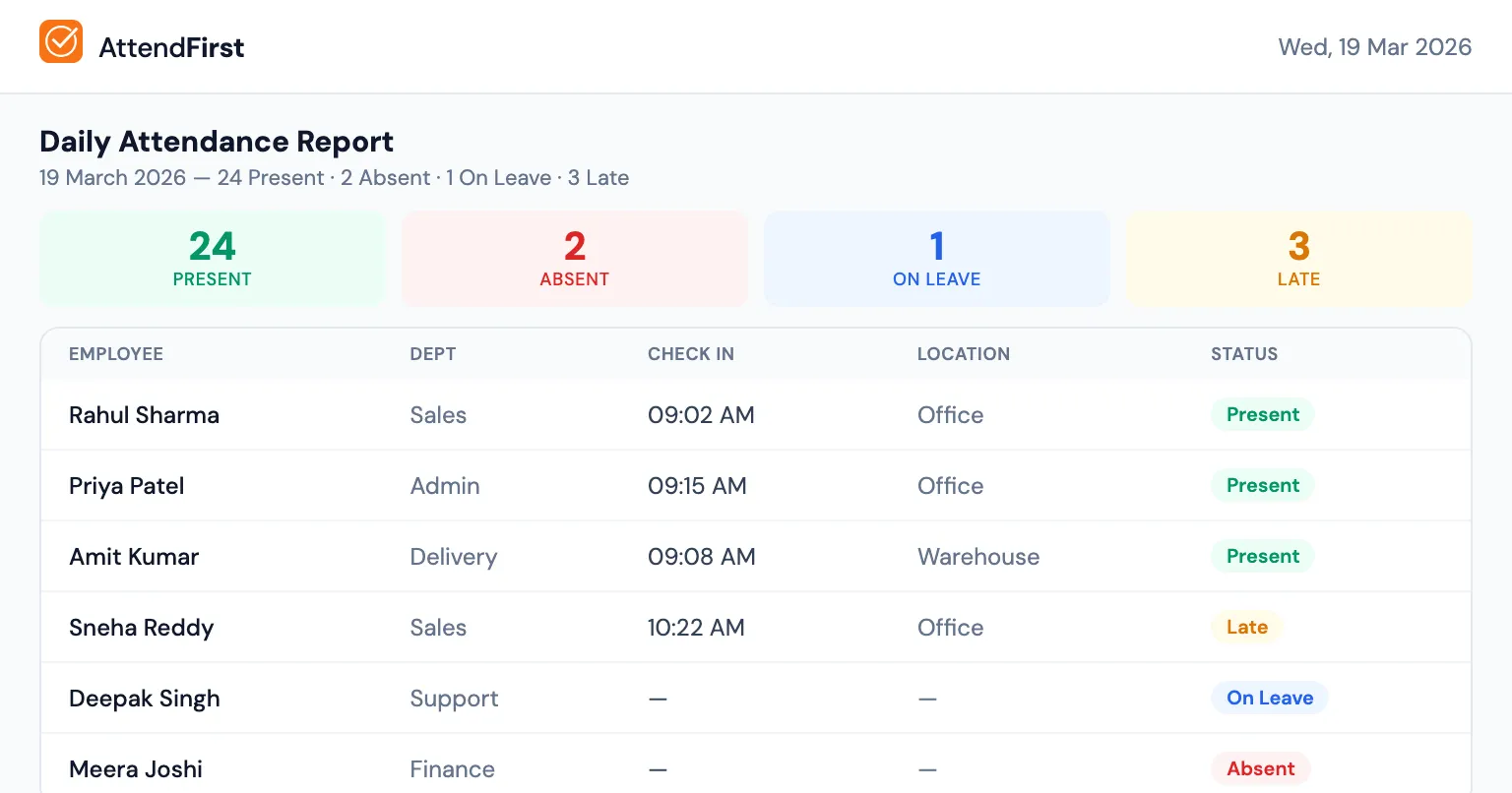
The modern alternative is an attendance app where employees check in from their own phone with GPS verification and an optional selfie. The same data that took a manager 30 minutes a day to type is captured in 3 seconds by the employee. At month end, the app already has every check-in, every late mark, and every leave day; you export it to Excel with one click.
Specifically, an app solves those problems like this:
- Two or more locations. One dashboard, every site in one view.
- Field staff. GPS coordinates on every check-in. A photo if you turn selfie on.
- Multiple check-ins per day. Session tracking, with break time separated from work time.
- Salary disputes. Every entry has a timestamp and a location. Evidence, not memory.
- CA export. One click to Excel or CSV with the exact columns above, pre-formatted.
- Someone forgot. There is nothing to forget, because the record is written at check-in rather than reconstructed on Friday.
Attendance sheet vs attendance app: the honest comparison
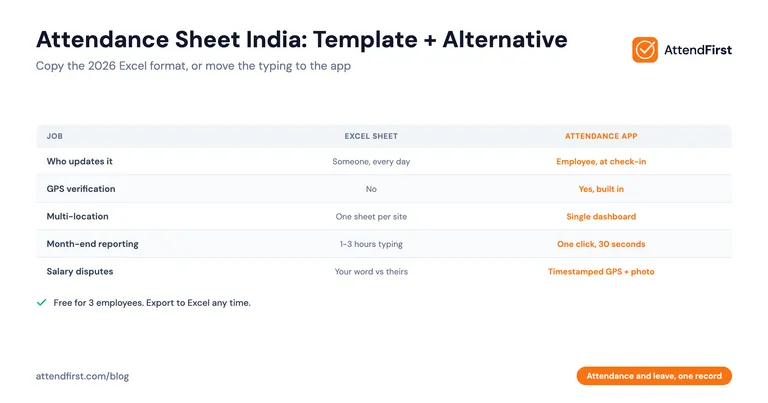
| Feature | Excel/Google Sheets attendance sheet | Attendance app |
|---|---|---|
| Cost | Free | Free for 3 employees, ₹3,000/year for 4-10, ₹499/emp/year above 10 |
| Who updates it | Someone, every day | The employee, at check-in |
| GPS verification | No | Yes, built in |
| Selfie photo on check-in | No | Yes, optional |
| Multi-location | Separate sheet per site | Single dashboard, unlimited sites |
| Late / half-day rules | Manual, per-cell | Configurable shift rules, auto-applied |
| Leave balance tracking | Separate sheet | Built-in, auto-computed |
| Month-end reporting | 1-3 hours | One click, 30 seconds |
| Disputes | Your word vs theirs | Timestamped GPS + photo |
| Payroll export | The sheet itself | CSV with company name, dates, hours, status |
You can still get an Excel export
This is the part owners miss: moving off a sheet does not mean giving up Excel. AttendFirst produces a monthly attendance report with the same columns as the template above, plus a couple that a sheet cannot compute (total work hours, break hours, late minutes). You export it as a CSV that Excel on Windows opens correctly for Indian names. Your CA gets the same file shape they are used to, with zero typing from your side.
If you still want to use a sheet, here is how to do it well
If you are at 5 employees in one location, Excel is probably fine for another year. Make it less painful:
- Keep a separate tab per month. Do not scroll 6 months sideways.
- Put the holiday list on a second sheet. Reference it for the H cells with VLOOKUP.
- Use data validation on the day columns so only P, A, HD, CL, SL, EL, WO, and H are accepted.
- Save the master sheet on Google Drive, not one person’s laptop.
- Decide now, in writing, who updates the sheet and when. “We will figure it out” is how weeks go missing.
Quick answer: when should you move off the sheet
- Staying on Excel: 1-8 employees, one location, no field work, CA is happy.
- Move to an app: more than 15 employees, any second location, any field staff, or a single salary dispute in the last quarter.
You do not need to throw the sheet away the day you sign up. Run both for a month. If the app does not save you time or prevent one dispute, cancel and keep the sheet. If it does either, stop typing cells at 10 PM.
Move attendance and leave into one record
AttendFirst keeps the sheet and the leave record as one thing: GPS, selfie, and QR check-in, leave requests and balances, Indian holidays pre-loaded, and a monthly attendance report that exports to Excel with the days off already counted. Teams of 4 to 10 pay a flat ₹3,000/year, and up to 3 employees costs nothing. No payment required, no app install for your team. Most SMBs are live in under 10 minutes.
Start free at attendfirst.com or read the attendance register app comparison for a closer look at what changes when you drop the paper book.
Frequently asked questions
Where can I download a free attendance sheet in Excel for India?
The monthly attendance sheet on this page downloads free as .xlsx or PDF, with no email address and no watermark. It is built for Indian workplaces: separate columns for casual, sick, and earned leave, a half-day code, a payable-days column, and an attendance percentage. The Excel version carries the COUNTIF formulas already, so the totals fill themselves as you type the daily codes.
What is an attendance sheet?
An attendance sheet is a monthly table that records whether each employee was at work on each day, using short codes (P for present, A for absent, HD for half day, CL for casual leave, SL for sick leave, EL for earned leave, WO for weekly off, H for holiday). Indian businesses use the sheet for salary calculation, leave tracking, and settling disputes about days worked. A workable sheet needs one row per employee, one column per day of the month, and summary columns for present days, each leave type, payable days, and attendance percentage.
How do you create an attendance sheet in Excel for an Indian business?
Create a header row with Employee Code, Name, Department, columns for Day 1 through Day 31, and summary columns for Present, Half day, CL, SL, EL, Weekly off, Holiday, Absent, Payable days, and Attendance %. Use COUNTIF formulas for the totals, for example `=COUNTIF(D2:AH2,"P")` for present days and `=COUNTIF(D2:AH2,"CL")` for casual leave. Payable days is `=AI2+(AJ2*0.5)+AK2+AL2+AM2+AN2+AO2`. Shade weekend columns grey and holidays light red so a wrong mark is visible. Use data validation on the day columns to restrict entries to valid codes, and store the master sheet on Google Drive so it is not trapped on one person's laptop. A ready-made version of exactly this sheet is downloadable free at the top of this page.
When should an Indian business switch from an attendance sheet to an attendance app?
Switch when any of these apply: more than 15 employees, more than one location, field or delivery staff, shift work with multiple check-ins per day, a recent salary dispute about attendance days, or a week of data lost because someone forgot to update the sheet. At that point, the sheet has become a bottleneck rather than a tool. For 1-8 employees in a single location with no field work, a well-formatted Excel sheet is still fine for another year.
Can an attendance app still produce an Excel attendance sheet for my CA?
Yes. AttendFirst exports a monthly attendance report as a CSV that Excel opens correctly for Indian names, with the same columns as a typical attendance sheet plus extras that a sheet cannot compute - total work hours, break hours, and late minutes. Your CA or payroll person receives the same file shape they already know, with zero manual typing from your side. You keep Excel. You stop typing into it every night.
Get attendance tips for Indian businesses
One practical guide per week. No spam.
Put attendance and leave in one record
Indian holidays and weekly offs come already loaded. Setup takes 5 minutes, and no payment is required to start.