Attendance and Leave.
One Record.
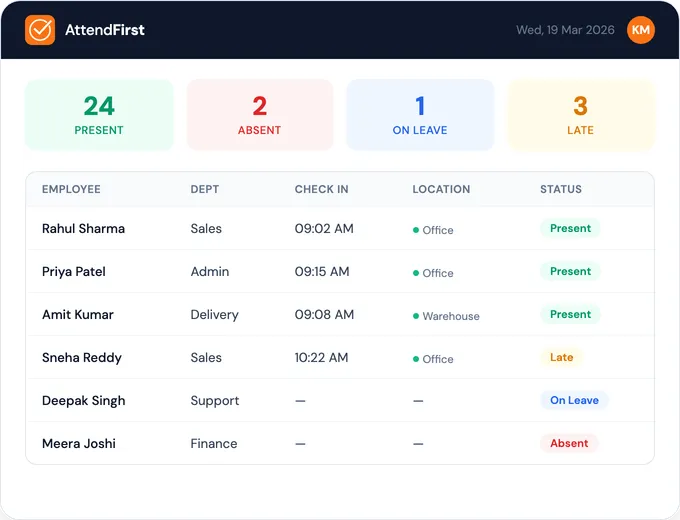
Employees mark attendance from their own phone. Leave requests, balances, weekly offs, and the Indian holiday list sit in the same place. At month-end the two agree, because there is only one record to check.
AttendFirst is attendance and leave software for Indian businesses: shops, offices, clinics, factories, and field teams. Check in by GPS, selfie, or QR code. Every feature is on every plan. Teams of 4 to 10 pay a flat ₹3,000/year. From the 11th employee, ₹499 per employee per year. Up to 3 employees is free, forever. Billed annually.
2,000+Indian businesses use AttendFirst
✓ Gazetted holidays and weekly offs pre-loaded ✓ Works on any phone ✓ Setup in 5 minutes
The Day Worked and the Day Off.
Same Record.
Your team's phones do the marking. Leave, weekly offs, and the holiday list are already set up for India. Payroll and salary slips are coming soon, built on the same record.
GPS + Selfie + QR Check-In
Three ways to check in. Employees use whatever works: GPS location, a live selfie, or scan a QR code. All three are free. All three make buddy punching nearly impossible.
Compare with biometric systems →Works on Any Phone
No app download needed. Just open in browser. Works on iOS, Android, even old phones.
See all features →Reports Your CA Can Use
Daily attendance and monthly summaries with one click. Export as Excel for your CA or payroll software. No manual counting, no formula errors.
See a sample report →Check-in & leave alerts
Late alerts, leave requests and approvals, a holiday reminder the evening before, and a Monday summary. You stop chasing people.
See all notification types →Break and session tracking
Multiple check-ins per day. Custom break types (lunch, tea, training). Late and half-day flagged automatically.
See session tracking details →Leave in the same place
Employees apply, managers approve, and the balance updates itself. Half-days, weekly offs, and gazetted holidays are already Indian. Nobody has to ask "how many days do I have left?" again.
See how leave works →Every branch on one account
Each shop, outlet, or site gets its own GPS radius, selfie rule, holiday list, and leave types. Check-ins from outside the radius get flagged.
See how branches work →See who is in right now
See today's check-ins as they come in, who is late, who is on leave, and which leave requests are waiting.
See the dashboard →Missed punches flagged for review
A forgotten check-out, a check-in outside the radius, or a failed selfie puts that day on a review list. You fix it once and the edit is logged.
See how review works →Set Up in 5 Minutes
No consultants. No onboarding calls. Sign up, add your team, share a link.
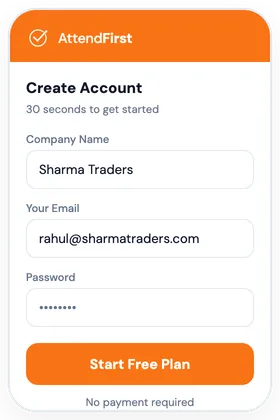
Sign Up
Create your account with just email and company name. No payment required.
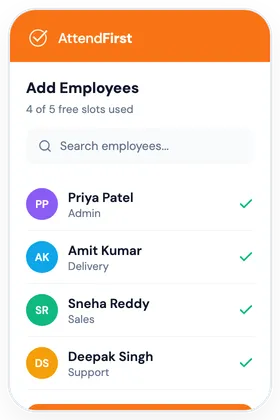
Add Employees
Add employees manually, or share a join link and let them register themselves. Assign departments and shifts.
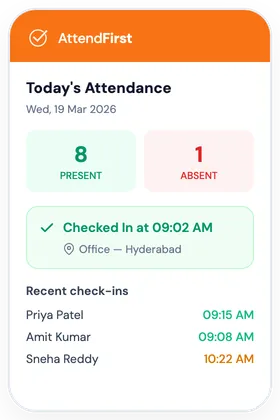
Start Tracking
Share the link with your team. Employees check in with GPS, selfie, or QR from their phone browser, and apply for leave in the same app.
No payment required
Attendance in One Place. Leave in Another.
Here's what changes when both sit in the same record.
Small Offices
- No more calling to check who's in
- Late arrivals flagged automatically
- Monthly report in 1 click, not 2 hours
Retail Stores
- GPS proves staff is at the right store
- Selfie stops buddy punching
- No disputes at month-end salary
Clinics & Schools
- Staff check their own leave balance
- Leave tracking without WhatsApp chaos
- Indian holidays pre-loaded
- Free forever plan, every feature included
Factories & Multi-Shift
- Works even with worn or wet fingerprints
- Morning, night, split shifts - each worker gets theirs
- Onboard 40 contract workers in 10 minutes
Works on any phone. No payment required to start, and every feature is on every plan.
Every Feature. Every Plan.
Free forever plan, every feature included. Attendance, leave, reports, and Excel export are on every plan. The only thing that changes is how many people you have.
✓ Free forever plan ✓ No payment required ✓ Nothing held back for a higher tier
Frequently Asked Questions
Everything you need to know about AttendFirst. Can't find the answer? Reach out to our team.
Is there a free plan?
Yes. Our free plan is forever, for up to 3 employees. All features included. No time limits. No payment required. No forced upgrade.
Does AttendFirst work without internet?
An internet connection is needed at the time of check-in to record GPS location and upload the selfie. The app works on any mobile data connection: 3G, 4G, or Wi-Fi. Offline check-in is not supported since GPS verification requires connectivity.
How does AttendFirst prevent proxy attendance?
Selfie check-in requires employees to take a live photo at the time of check-in, so you can see exactly who is present. GPS location is recorded simultaneously, confirming the employee is at the correct workplace. The combination of selfie + GPS makes buddy punching practically impossible.
Does AttendFirst have an Android or iOS app?
AttendFirst has an Android app on Google Play. On iPhone, employees add AttendFirst to the home screen from Safari. It also works in any phone browser with no download, including older Android devices.
Can I export attendance data for payroll?
Yes. Export your attendance data as Excel/CSV with one click. The export includes days present, absent, late, and leave taken per employee, ready to send to your CA, payroll person, or import into payroll software like Tally.
Does AttendFirst do payroll?
Payroll is coming soon, starting with salary slips built from the attendance and leave record. Until then, export the month as Excel or CSV for your CA or payroll software.
What payment methods do you accept?
We accept all major payment methods in India: UPI (Google Pay, PhonePe, Paytm), Credit/Debit Cards (Visa, Mastercard, RuPay), Net Banking, and Bank Transfer (NEFT/RTGS). All payments are processed securely through Cashfree.
Do you offer refunds?
No. All payments are final. We recommend testing with the free plan (up to 3 employees, all features, no time limit) before upgrading. That way, you know exactly what you are paying for.
Can I reduce my employee count mid-term?
Licenses are fixed for the billing year. You can adjust the count before renewal. Contact support at least 7 days ahead.
Can I cancel anytime?
You can cancel to avoid auto-renewal. You'll retain access until your billing period ends. Cancellation must be done at least 7 days before renewal.
Is my data secure?
Your data is secure. We use industry-standard 256-bit SSL encryption, store data in Tier-3 Indian data centers, and maintain regular backups. Your company's attendance data belongs to you. We never share it with anyone.
Do you offer support?
Yes, for all customers, free and paid. Inside the app, the help chat answers from our docs and passes you to a person when it can't help. You can also raise a support ticket with screenshots, or email us. We reply within 24 hours on working days (Mon-Sat).
What happens after the free plan?
Our free plan is free forever for up to 3 employees. Teams of 4-10 pay ₹3,000/year flat. From the 11th employee onward, ₹499 per employee per year (launch price, billed annually).
Can employees check in multiple times per day?
Yes. Employees can check in and out multiple times in a day. Each session is tracked separately with timestamps. You can also define custom session types like lunch break, tea break, or client visit.
Does AttendFirst send attendance reminders?
Yes. Admins get late alerts, alerts for check-ins that need review, leave requests as they come in, and a weekly summary every Monday. Employees hear when their leave is approved or rejected. Holiday reminders go out the evening before. Alerts arrive as push notifications and email.
Can employees join without the admin adding them?
Yes. Admin can create a join link (with an optional PIN for security). Employees open the link, fill in their details, and submit a join request. Admin reviews and approves it. The employee's account is created automatically.
Still have questions?
Contact Our TeamPut Attendance and Leave in One Record.
Set up in 5 minutes. Works on any phone. Free forever plan, every feature included. The Indian holiday list, weekly offs, and half-day rules are already in there.
✓ Free forever plan ✓ No payment required to start ✓ Every feature on every plan
From Our Blog
Practical guides on attendance tracking and leave management for Indian businesses.
Attendance Registers Under the Labour Codes: What Changed (2026)
The four labour codes replaced the Factories Act and 28 other laws on 21 November 2025. What changed for your attendance register, muster roll, and leave.
Read more →Online Attendance System: How It Works for Indian SMBs
How an online attendance system works end to end - phones, cloud records, admin dashboard - what you need to run one, and what it costs in India.
Read more →Employee Attendance App: What It Does, Costs & How to Choose
What an employee attendance app does, the features that matter for Indian SMBs, honest cost math vs biometric machines, and when you don't need one.
Read more →