AttendFirst admin attendance dashboard - daily overview
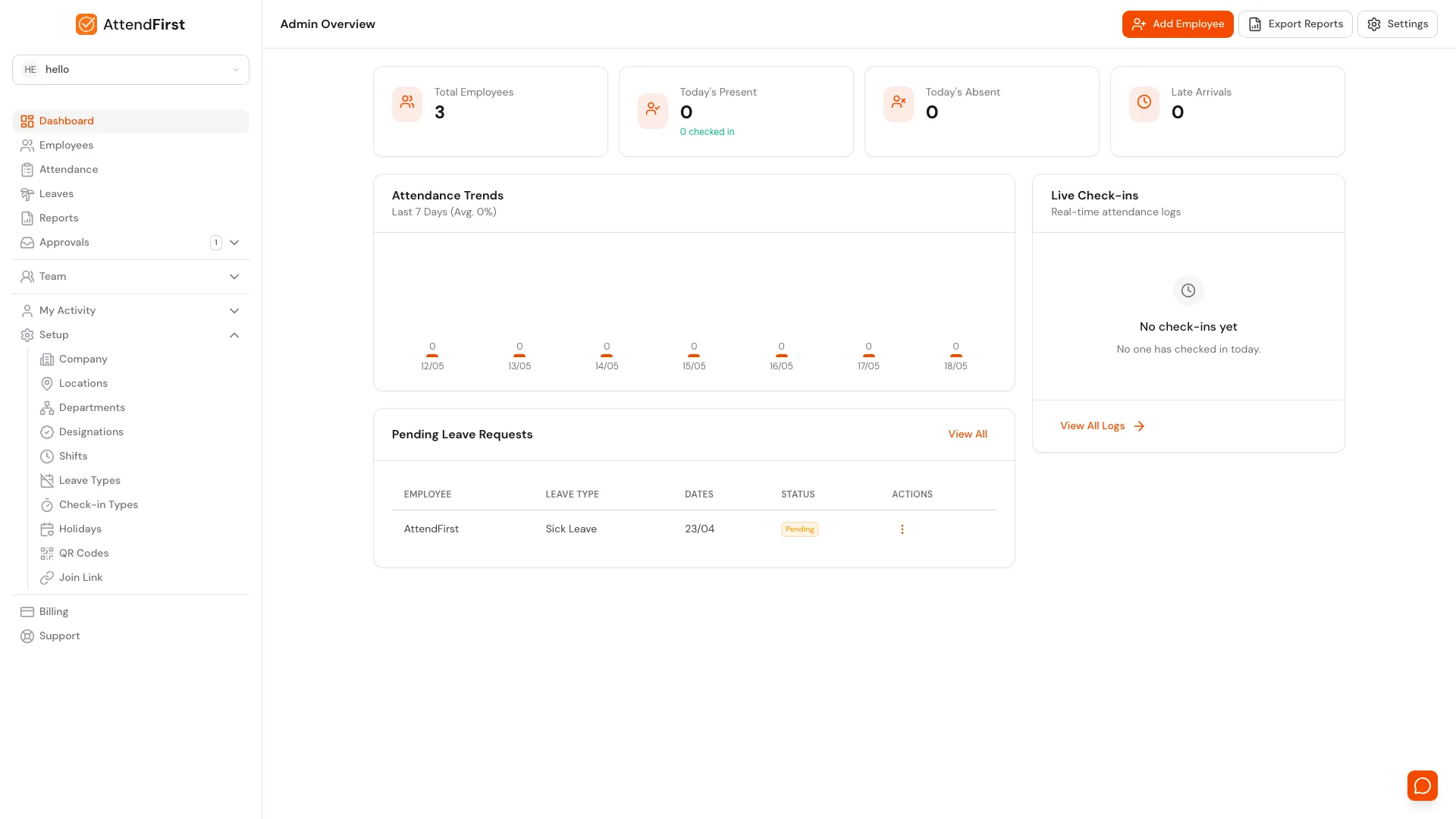
The AttendFirst admin dashboard shows total headcount, today attendance status, a 7-day trend, pending leave approvals, and live check-ins on one screen.
The Admin attendance dashboard at app.attendfirst.com/admin/dashboard shows total headcount, today’s attendance status, pending leave requests, and live check-ins on one screen. Every number links to the full view.
Page header and shortcuts

The header keeps the three most common admin actions one click away.
- Add Employee: opens the employees list where the Add Employee slideover lives. See Managing employees.
- Export Reports: jumps to the reports page with daily and monthly CSV exports. See Reports and CSV export.
- Settings: opens the settings index with working hours, holidays, departments, and more.
Stats cards: today at a glance

Four cards sit at the top of the dashboard. Each one reads the current day in the company timezone.
| Card | What it counts |
|---|---|
| Total Employees | Every active employee. Deactivated and exited employees are excluded. See Managing employees. |
| Today’s Present | Employees whose first check-in is on time. A small green N checked in line below counts everyone who checked in, late arrivals included. |
| Today’s Absent | Active employees with no check-in yet. Approved leave, holidays, and weekends are not counted. |
| Late Arrivals | Employees whose first check-in is after the late threshold for their shift. Default threshold is 30 minutes past shift start. See Working hours and shifts. |
If a number is unavailable because of a network error, the card shows a dash instead of 0 so you can tell “no data” apart from “zero”.
Attendance trend: last 7 days
The Attendance Trends widget draws a bar per working day for the last seven days. Each bar’s
height is the count of employees who attended (present plus late) that day. The subtitle shows the
7-day average as Avg. X%, calculated as attended divided by total employees, averaged across
days with data.
Hover a bar to see the breakdown: X/Y attended (A on time, B late), C absent.
Use this widget to spot days when attendance dips. A single quiet Monday is usually nothing; four in a row is worth investigating.
Pending leave requests
The Pending Leave Requests table lists up to five of the oldest pending requests. Each row
shows the employee, leave type, date range, and a status badge. Click View All in the top
right to open the full queue at /admin/leaves?leaveStatus=pending, where you can approve or
reject from the three-dot menu.
When the queue is empty, the widget shows All clear. For the submission side, see Leave requests.
Live check-ins
The Live Check-ins panel is a feed of the most recent five check-ins today, newest on top. Each row shows the employee, avatar initials, and check-in time in 12-hour format. A red Late badge appears next to anyone who clocked in after their late threshold.
When no one has checked in yet, it shows a quiet No check-ins yet. View All Logs at the
bottom opens the full day’s attendance at /admin/attendance, where you can see GPS pins, selfies,
and session types for every record.
The onboarding banner
On a brand-new company, a dismissible Getting started banner sits above the stats. It tracks three milestones:
- Company setup: always complete once you finish the setup wizard.
- Add employee: ticks when you have at least one employee.
- First check-in: ticks when anyone in the company checks in for the first time. The action on this row copies the company join link to your clipboard so you can paste it into WhatsApp.
Close the banner with the X button and it stays dismissed in that browser. Once all three milestones are complete, AttendFirst hides it automatically. Details in the Onboarding doc.
Frequently asked questions
How often does the dashboard refresh?
Data loads on page open and whenever you switch back to the tab. Live Check-ins updates as people clock in through the day, so leaving the tab open gives you a near-real-time feed. Hard refresh the tab to force a clean fetch.
Why does Today’s Present show zero when people have already checked in?
Today’s Present excludes anyone who arrived late. They get counted under Late Arrivals instead.
For the true total of people at work, read the small N checked in line under the Present card.
It sums present plus late.
Can I see a dashboard for just one department?
Not on this screen. The dashboard is company-wide. For department slices, use the daily report on Reports and filter by department, or open the department from Setup → Departments.
Why does the 7-day average stay at 0%?
The chart needs at least one working day with both a total employee count and at least one check-in. On day one of using AttendFirst, the chart is empty by design. By the end of the first week, the average reflects real attendance.
Related docs
- Onboarding. The wizard that leads to this dashboard.
- Managing employees. The Add Employee button’s destination.
- Reports and CSV export. The Export Reports button’s destination.
- Leave requests. The employee side of the pending queue.
- Manual attendance. Fix the days that don’t look right in the trend.
Frequently asked questions
How often does the AttendFirst dashboard refresh?
Data loads on page open and whenever the tab gets focus. Live Check-ins reflects the current day's attendance as people mark themselves in. Hard refresh the tab to force a fresh fetch.
Why does Today's Present show zero when people have checked in?
Today's Present counts employees whose first check-in of the day is on time. Late arrivals move into Late Arrivals, not Present. Add the two to get total attended.
What's the difference between Today's Present and "checked in"?
Today's Present excludes late arrivals. The small `N checked in` line below counts everyone who has at least one check-in, late or not. Use the second number for a true headcount.
Can I customize which widgets show on the dashboard?
Not yet. Every admin sees the same layout. The trade-off keeps the dashboard predictable for bookkeeper handovers and quick status checks over the phone.
Why is the 7-day average attendance 0%?
The chart divides attended (present plus late) by total employees for each working day. If no one has checked in over the last 7 days, or if you are still in the first week of using AttendFirst, the average stays at 0% until real data rolls in.