Online Attendance System: How It Works for Indian SMBs
Payal focuses on leave management and compliance workflows for Indian businesses.
TL;DR: An online attendance system stores check-ins in the cloud instead of a register or a machine on the wall. Employees mark attendance from their phones, the owner watches a live dashboard from anywhere, and month-end reports build themselves. You need nothing except the smartphones your staff already carry - no server, no hardware, no IT person.
I set up attendance systems for small businesses, and the most common question I hear before a switch is some version of “but what do we need to buy?” The answer surprises most owners: nothing. That is the whole point of an online system. The register needed a book. The biometric machine needed a device, wiring, and a service contract. The online system runs on phones that are already in your employees’ pockets.
Here is how the system actually works, piece by piece.
What “online” means for attendance
Three things change when attendance moves online:
| Register / machine | Online system | |
|---|---|---|
| Where the record lives | One book or one device, at one location | Cloud storage, backed up, readable from anywhere |
| When you see it | End of day, or when someone brings the register | Live, as check-ins happen |
| What happens if it’s lost | The month’s records are gone | Nothing - no single copy to lose |
The record moving to the cloud is what makes everything else possible: the live dashboard, the automatic reports, the multi-location view, and the audit trail that survives a wage dispute.
How the system works, end to end
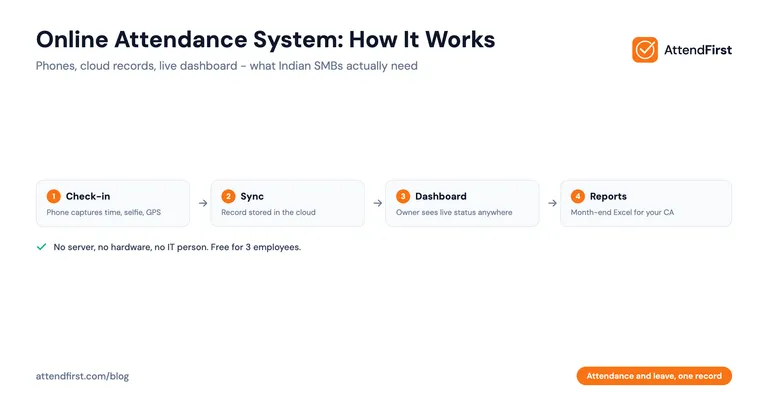
The daily loop has four steps and takes each employee about 10 seconds:
- Check-in. The employee opens the app at shift start and taps check in. The app records the exact time, takes a selfie, and captures the GPS location.
- Sync. The record goes to the cloud immediately - or, if the signal is weak, it waits on the phone and uploads when coverage returns, original timestamp intact.
- Dashboard. The owner’s screen updates within seconds: present, late, absent, on leave. A shop owner in one city can watch staff check in at an outlet in another.
- Reports. At month end, the system counts working days, flags late arrivals, folds in approved leave, and exports the daily and monthly attendance reports to Excel for your CA.
Check-out works the same way in reverse, and the system computes hours worked from the pair.
The check-in methods
App-based systems give you three ways to mark attendance, and most businesses mix them:
- Selfie + GPS - the default for field staff and offices. One glance at the photo and the map pin settles who checked in and from where. More in selfie vs biometric attendance.
- QR code - a printed code at the entrance; staff scan it to check in. Fastest option for a fixed location like a shop or factory gate. Setup guide: QR code attendance in India.
- Manual entry by admin - for the employee whose phone died, or the worker without a smartphone. Logged with an audit trail so backfilled entries stay visible as backfilled.
What you need to run one
This list is short on purpose:
- A smartphone per employee. Any Android with a front camera works, including the ₹6,000 models. For staff without phones, a shared device at the entrance covers them via QR.
- An account with an attendance app. Signing up takes minutes. If the app is a PWA it does not even need a Play Store download.
- Half an hour of setup. Add employees (or send them a self-join link on WhatsApp), set your working hours and late-mark rules, print a QR code if you want one at the door.
Notice what is not on the list: a server, a static IP, wiring, a biometric device, an AMC, or an IT person. Owners who ran biometric machines are usually the most surprised - the machine’s real costs (device, installation, UPS, service visits) simply do not exist in an online system.
Where online systems win, and where they don’t
The wins come from the cloud record: live visibility across locations, evidence that holds up in disputes, reports that compile themselves, and a system that scales from 5 employees to 75 without new hardware. If you are weighing an online system against biometric machines or sticking with the register, the attendance management system guide compares all four types with cost math.
The limits: employees need smartphones (nearly universal now, but not on every factory floor - some ban phones at workstations), photos and location need DPDP Act consent, and truly networkless sites need an app with offline capture. If your workforce cannot carry phones at all, a biometric device at the gate is still the right tool.
Setting it up: what I tell owners
The pattern that works, from businesses that switched cleanly:
- Set up the account, shifts, and late rules yourself first - one afternoon.
- Pilot with 2-3 employees for two days so the questions surface early.
- Roll out to everyone with a 15-minute demonstration. Expect the “why is the boss photographing us” question; answer it straight - the photo protects their salary days as much as your wage bill.
- Run the register in parallel for one month, compare totals, then retire it.
The full version with every objection handled is in the attendance app rollout checklist.
What it costs
Most online attendance systems in India price per employee per month, which lands at Rs.2,400-12,000+ per year for a 10-person team and grows with every hire.
AttendFirst prices annually instead: a flat ₹3,000/year for teams of 4 to 10, ₹499/employee/year beyond that, and nothing at all up to 3 employees. GPS, selfie, and QR check-in, leave requests and balances, and Excel export are on every plan. No payment required to start.
Frequently asked questions
What is an online attendance system?
An online attendance system records employee check-ins over the internet instead of in a physical register or a standalone machine. Employees mark attendance from a phone (app-based) or a shared device, the record is stored in the cloud with a timestamp, and the owner sees live status and reports from any browser. No wiring, no server in the office, no data trapped in one device.
How does an app-based attendance system work?
The employee opens the app at shift start and taps check in. The app captures the time, usually a selfie, and the GPS location, then sends the record to the cloud. The admin dashboard updates within seconds - who is in, who is late, who is absent. At month end the system totals working days per employee and exports to Excel. The whole system is the phones your staff already carry plus a web dashboard.
What do I need to set up an online attendance system?
Three things: a smartphone per employee (or a shared device at the entrance for QR check-in), an account with an attendance app, and 30-60 minutes to add employees and set working hours. No server, no biometric hardware, no IT person, no annual maintenance contract. If your team uses WhatsApp, they can use an attendance app.
Is an online attendance system legally valid in India?
Yes. The Shops and Establishments Acts of Indian states accept digital attendance records as long as they show daily working hours, weekly offs, and overtime, and can be produced during an inspection. Timestamped cloud records with photos are usually stronger evidence in a wage dispute than a handwritten register. Under the DPDP Act 2023, take employee consent for storing photos and location.
How much does an online attendance system cost in India?
Most charge per employee per month, working out to Rs.2,400-12,000+ per year for a 10-person team. AttendFirst charges annually: free for up to 3 employees, ₹3,000/year flat for 4-10 employees, then ₹499/employee/year. There is no hardware to buy, which is where the real saving sits - a biometric setup starts around Rs.5,000-25,000 per location before AMC.
Does an online attendance system work without internet?
Check-ins need a connection to sync, but good systems capture the record on the phone when the signal drops and upload it once coverage returns, with the original timestamp intact. For an office or shop with normal mobile data coverage this never comes up. For remote sites, confirm the app supports offline capture before choosing.
Get attendance tips for Indian businesses
One practical guide per week. No spam.
Put attendance and leave in one record
Indian holidays and weekly offs come already loaded. Setup takes 5 minutes, and no payment is required to start.