Leave Management Software
in the Same Record as Attendance.
Employees request leave from their phone. The reporting manager approves it. The balance updates, and the attendance record shows those days as on leave. You stop reconciling a WhatsApp thread against a register at month-end.
Teams of 4 to 10 pay a flat ₹3,000/year. From the 11th employee, ₹499 per employee per year. Up to 3 employees is free, forever. No payment required to start.
What AttendFirst does for leave
A leave management system records each request, sends it to an approver, keeps the balance per leave type, and shows who is off when. AttendFirst does this for Indian small businesses, and it writes approved leave into the same attendance record that holds check-ins.
In most HR suites, leave is one module among many. The table below lists every leave rule AttendFirst applies, so you can check it against your own policy before you sign up.
The leave rules, one by one
Each row below describes what the software does today. Leave is on every plan, including the free one.
| Rule | How it works |
|---|---|
| Leave types | A new company starts with Privilege Leave (PL), Sick Leave (SL), and Casual Leave (CL), 12 days each. Maternity and paternity leave are also created, but only for employees you assign. You can add any other type with a name, a short code, and a yearly quota in steps of half a day. A type can apply to the whole company or to one branch. |
| Quota for one person | You can assign a leave type to selected employees and set a different quota for one of them. That quota is used as written. |
| Half-day leave | An employee can request half a day for a single date. It counts as 0.5 days in the balance. If the employee works the other half, both are kept on the same day. |
| Pro-rated quota | For a person who joins mid-year, the quota is cut to the months left in the year, with the joining month counted in full. Someone who joins in July gets 6 of 12 days. Maternity and paternity leave are not pro-rated. |
| Balance | Quota for the calendar year, minus the days in approved requests. A new request is checked against approved and pending days together, so nobody can ask for more than they have left. A request covers dates within one calendar year. |
| Holidays | Load the India holiday list for 2025, 2026, or 2027 in one step, then edit it. Add your own holidays, and mark any holiday as optional so it is labelled on the calendar. A holiday can apply to the whole company or to one branch. Holidays are not charged to the balance. |
| Weekly offs | Set the working days of the week for the company, with a different week for one employee if needed. Weekly offs inside a request are not charged. |
| Approval | The reporting manager approves requests from their own team by email notification, and an admin can approve anyone. If the employee has no manager, the admins are notified. A manager cannot approve their own request. |
| Cancellation | The employee, their manager, or an admin can cancel a pending request. Only an admin can cancel an approved one. Cancelling an approved request removes its on-leave days from attendance and writes the change to the audit log. |
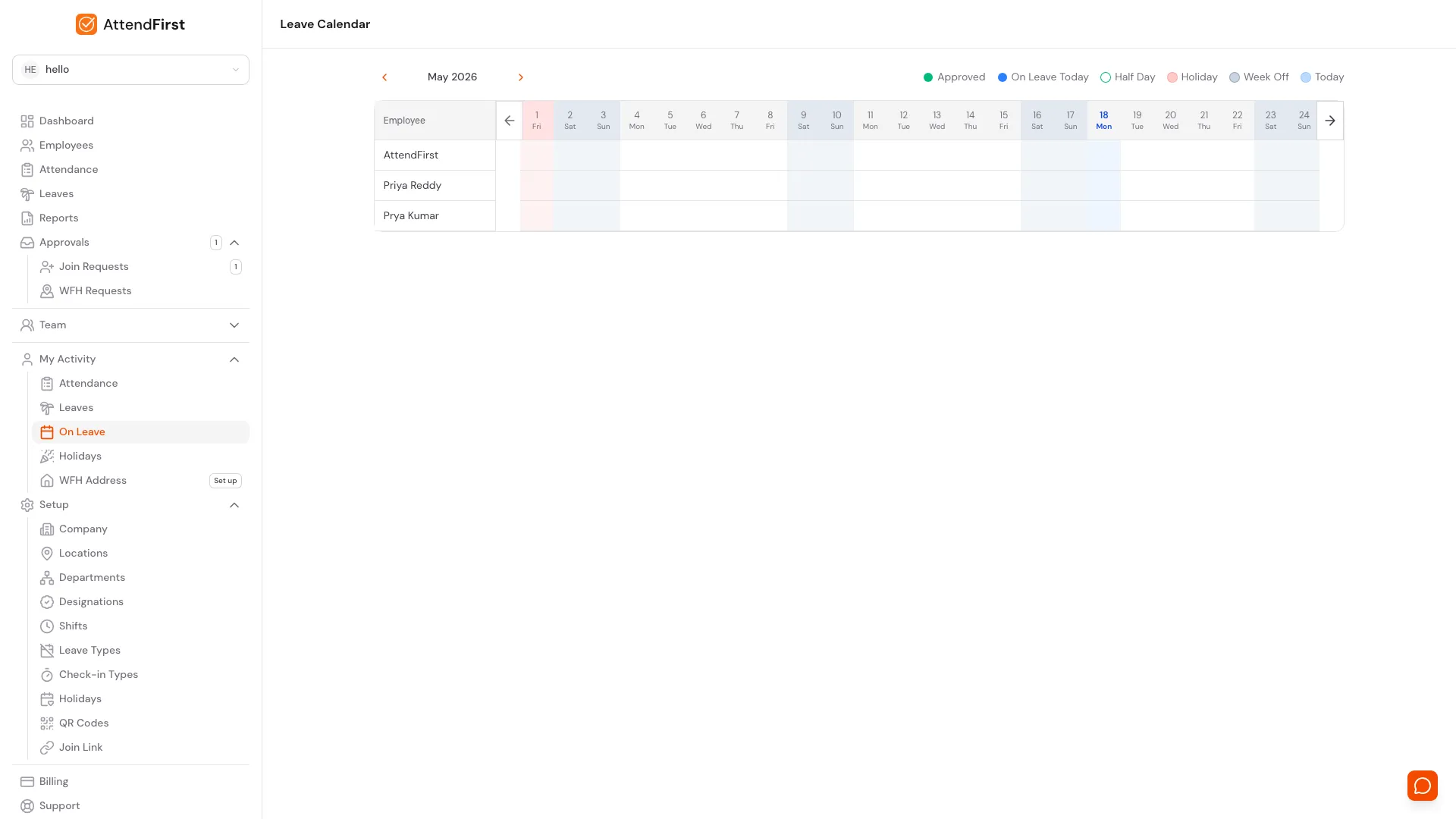
| Leave calendar | A month view shows who is off on which day, with holidays and weekly offs shaded. The company-wide view shows approved leave for everyone without the reasons. An admin sees the whole company, and a manager sees their own team. |
| Low balance alert | An employee with less than 2 days left on a leave type gets an email on the first of the month. |
What you see on screen
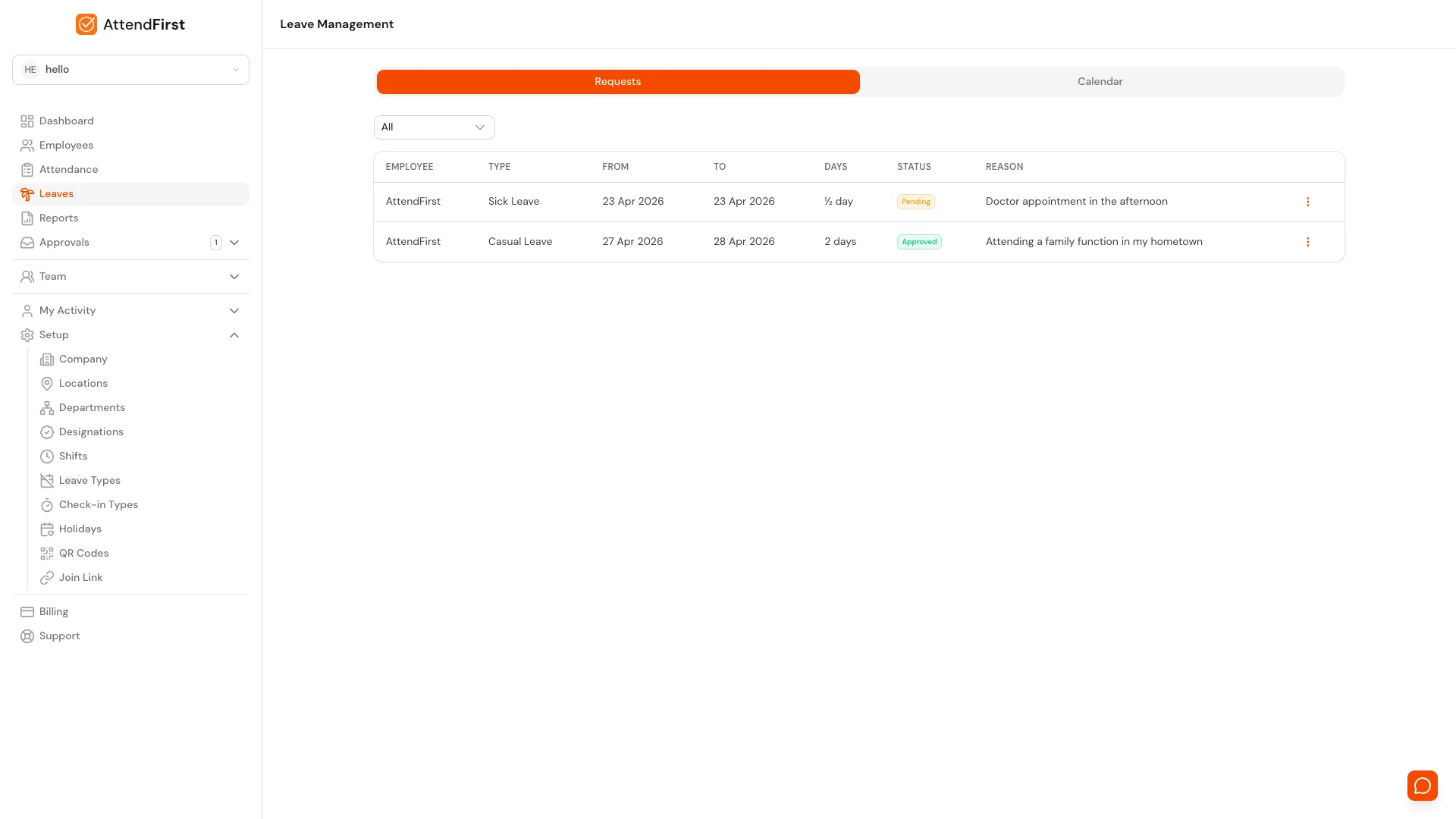
The calendar shows holidays and weekly offs next to approved leave. The requests list shows each request with its type, dates, days, and status. Both screenshots use demo data.
Why attendance and leave belong in one record
In many small businesses, the register records who showed up and WhatsApp holds the leave. At month-end nobody can match the two, so the number used to pay people is a guess. A paper leave register, with a written leave application filed for each request, helps, but it is still a second file next to attendance.
In AttendFirst, an approved request marks each working day in the range as on leave in the attendance record. A person on approved leave does not appear as absent in your reports. A full-day approval is refused if attendance is already recorded on one of those days, so the record cannot hold two answers for the same day.
Check-in by GPS, selfie photo, or QR code is part of the same product. The selfie is a photo on each check-in that you can review. Read more in attendance and leave in one tool for Indian small businesses.
What leave management costs
Teams of 4 to 10 pay a flat ₹3,000/year. From the 11th employee, ₹499 per employee per year. Up to 3 employees is free, forever. Every feature is on every plan, and billing is annual. No payment is required to start.
If you are comparing tools, read how AttendFirst compares with HR suites.
How to set up leave
- Create your company and set the working days of the week. See company settings.
- Load the India holiday list and add your own. See holidays.
- Review the starting leave types and change the quotas. See leave types.
- Add your employees and set each person's reporting manager. See employees.
- Ask employees to request leave from their phone, and approve from the email notification. See leave approvals.
Leave management questions
What is a leave management system?+
A leave management system is software that records leave requests, routes each one to an approver, keeps the balance for each leave type, and shows who is off on which day. In AttendFirst, an approved request also marks those days as on leave in the attendance record, so the two records agree.
Which leave rules does AttendFirst support?+
You can create leave types with a yearly quota in steps of half a day, assign some types to selected employees only, and scope a type to one branch. Employees can request half-day leave. Quotas are pro-rated for people who join mid-year. Weekly offs and holidays inside a request are not charged. The reporting manager approves requests from their own team, and the admin can approve anyone.
How is the leave balance calculated?+
The balance for a leave type is its quota for the calendar year, from 1 January to 31 December, minus the days in approved requests. A half-day request counts as 0.5 days. When someone submits a new request, the check adds their pending requests to the approved ones, so an employee cannot request more days than they have left.
How does pro-rating work for someone who joins mid-year?+
For a leave type marked as pro-ratable, the quota is the yearly quota times the number of months left in the year, divided by 12, rounded up. The month of joining counts as a full month. Someone who joins in July gets 6 of 12 days. Maternity and paternity leave are not pro-rated, and an admin can set a different quota for one employee, which is used as written.
Who approves leave, and can an employee cancel a request?+
The approver is the employee's reporting manager, and an admin can approve anyone. A manager cannot approve their own request. If an employee has no manager, the request notification goes to the admins. The employee, their manager, or an admin can cancel a pending request. Only an admin can cancel a request that is already approved.
What happens to attendance when leave is approved or cancelled?+
Approving a request marks each working day in the range as on leave in the attendance record. For a full-day request, approval is refused when attendance is already recorded on one of those days, so you correct that first. When an admin cancels an approved request, the on-leave days are removed and the change is logged.
What if an employee has no smartphone?+
Employees raise leave requests from their own login in a phone or computer browser. For check-in, an admin can enter attendance by hand under manual attendance.
How much does AttendFirst cost for leave management?+
Leave management is on every plan. Teams of 4 to 10 pay a flat ₹3,000/year. From the 11th employee, ₹499 per employee per year. Up to 3 employees is free, forever. A team of 12 pays ₹3,998 a year. Billing is annual. No payment is required to start.
Put leave and attendance in one record
Set up your leave types and holidays, then add your team. No payment required to start.