Leave Register Format: Free Excel Tracker and PDF Card
Ravi works on attendance and workforce tools for Indian SMBs at AttendFirst.
TL;DR: A leave register records, for each employee and each leave type, the opening balance, the leave earned, the leave taken, anything carried forward or encashed, and the closing balance. Factories keep a leave with wages register under the OSH Code. Shops and offices follow their state Shops and Establishments Act. This page gives you the format, the rules that decide the numbers, and a free Excel tracker with working formulas plus a printable PDF card.
Leave disputes at a small business tend to start when nobody can show how a balance was reached. The employee remembers 12 days, you remember 9, and the WhatsApp thread that settled it scrolled away in March.
A leave register settles it, and you can keep one without software. Use the columns below, decide how leave is earned, and write each leave down on the day you approve it.
What columns does a leave register need?
A leave register needs eight columns for each employee and each leave type: opening balance, accrued, taken, encashed, closing balance, carry-forward cap, carry forward, and over the cap. Keep one block for each employee and leave type.
| Column | What you write | Example |
|---|---|---|
| Opening balance | Days brought in on 1 January (or the joining date) | 2.0 |
| Accrued | Days earned so far this year, month by month | 0.5 a month, so 3.0 after six months |
| Taken | Approved days used, with half days as 0.5 | 1.5 |
| Encashed | Days paid out instead of taken | 0 |
| Closing balance | Opening + accrued - taken - encashed | 3.5 |
| Carry-forward cap | The most your policy lets move into next year | 0 for casual leave, 30 for earned leave |
| Carry forward | The closing balance, up to the cap | 0 |
| Over the cap | What lapses or gets encashed at year end | 3.5 |
Behind the register sits a leave log: one row for each approved leave, with the date, the employee, the leave type, the days, and who approved it. The register is the summary. The log is the evidence. If you can only keep one, keep the log, because you can rebuild the register from it and you cannot rebuild the log from the register.
Which leave register does your business need?
In India, “leave register” means one of two records. Factories keep a leave with wages register under the OSH Code. Shops, offices, clinics, and restaurants keep the leave record their state Shops and Establishments Act asks for.
Factories: the leave with wages register
Factory workers earn annual leave with wages. The Factories Act 1948 used to govern this. It was repealed on 21 November 2025 and its provisions moved into the Occupational Safety, Health and Working Conditions (OSH) Code, 2020. The labour codes explainer covers the full change. The leave rules are these:
| Rule | OSH Code, 2020 |
|---|---|
| Days worked to qualify in a calendar year | 180 |
| Leave earned, adult worker | 1 day for every 20 days worked |
| Leave earned, adolescent or underground mine worker | 1 day for every 15 days worked |
| Carry-forward cap | 30 days, with the excess encashed at year end |
The register for this leave needs the year, the days worked, the leave earned, the leave taken, the days encashed, and the balance carried forward. The PDF card below includes a page laid out for it. State rules under the codes are still in draft in most states, so the official form number and layout can change. If your data is complete, you can copy it into whichever form your state finalizes.
Shops, offices, clinics, and restaurants: state Act leave
For these workplaces the state Shops and Establishments Act sets casual leave, sick leave, and earned or privilege leave. The quotas, the qualifying period, and the carry-forward and encashment rules differ from state to state, so this page does not give one set of numbers. Read your own state’s Act or your labour department’s notification, then put the result into the Settings sheet of the tracker. The sick leave vs casual leave guide explains how the three types usually differ.
Some businesses have both. A factory with an office block keeps the leave with wages register for the shop floor and the state Act register for the office staff.
Decide carry-forward and encashment first
Carry-forward and encashment cause most leave arguments, so write both rules down before you fill a single row.
Carry-forward is how many unused days move into the next year. A common pattern is that casual and sick leave lapse at year end, while earned leave carries forward up to a cap. Your state Act or the OSH Code may set the cap for earned leave. Whatever the cap is, give it its own column so the year-end number comes from a formula that anyone can check.
Encashment is paying for unused days instead of letting them lapse. Earned or privilege leave is the type that is usually encashed. Casual and sick leave usually lapse. Record encashed days in their own column, so a payout never gets mixed into leave taken.
This page covers the leave record only. The rupee amount of an encashment belongs in your payroll, and the rules for it depend on your wage structure.
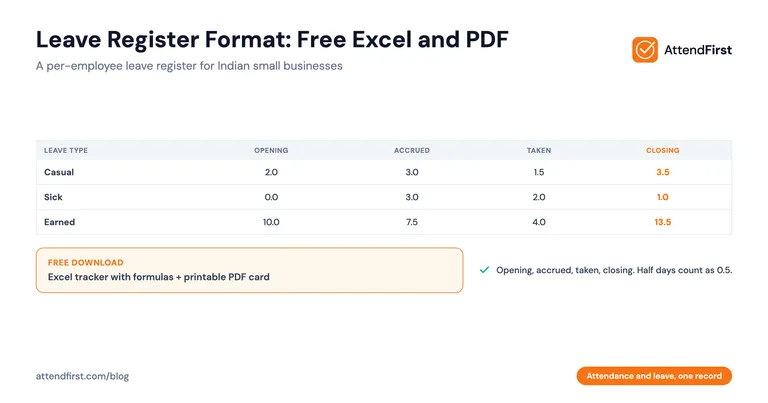
Leave register example: casual leave for six months
Asha joins in January with 2 days of casual leave brought forward. Your policy gives 0.5 days a month. At the end of June:
- Accrued: 0.5 x 6 = 3.0
- Taken: 1 day in February and a half day in March = 1.5
- Closing balance: 2.0 + 3.0 - 1.5 = 3.5
If casual leave lapses at year end, the cap is 0. At 31 December the carry-forward is 0 and everything left is over the cap. The arithmetic takes a minute. Keeping the register right depends on someone logging the March half day on the day it happens.
Free leave register tracker in Excel, plus a PDF card
| File | Use it for | Download |
|---|---|---|
| Leave register tracker | A working Excel register: 12 employees, three leave types each, with a leave log | Excel |
| Leave register card | A printable card for each employee, plus a leave with wages page for factory workers |
You do not need to give an email address. If you would rather not maintain a sheet, start tracking attendance and leave in the app instead. The Excel file has three sheets.
- Settings. Enter the register year, the number of months to count, and, for each leave type, the monthly accrual and the carry-forward cap. The values shown are examples. Replace them with your policy.
- Leave Log. Add one row for each approved leave. Enter 0.5 in the Days column for a half day. A request that crosses a year end needs one row for each year, because the register counts a row by its date.
- Leave Register. Type each employee’s name in the first row of their block, then enter an opening balance and any encashed days. Accrued, taken, closing balance, carry forward, and over the cap are formulas. The taken column uses SUMIFS on the leave log, filtered by employee, leave type, and the year you chose in Settings.
Check the first month against a calculation you do by hand before you rely on the balances. If you also count present days and loss of pay in Excel, the attendance formula guide has the COUNTIF formulas for each.
For the half-day rules themselves, see the half-day leave policy guide.
When is a spreadsheet enough?
When one owner approves every leave, this Excel tracker works well. It calculates accrual by multiplying a monthly rate by the months you count, and it shows carry-forward caps and encashment as columns you can see and edit. You can model your exact policy, including rules no software template expects.
The problems come from everything around the sheet. Nothing stops you editing a past row. Nobody but you can see their own balance, so you answer “how many days do I have left?” by message. The leave log and your attendance record are separate files, so a day logged as leave can still be marked absent. And if someone forgets to log a leave, the register is wrong and nothing shows it.
Human resources (HR) and payroll suites such as greytHR and Keka also include leave policies with accrual and carry-forward rules.
Keep leave and attendance in one record
Leave and attendance should agree, and in two separate files they often do not. AttendFirst keeps them as one record, so when a manager approves a leave request, the attendance record shows that person as on leave for those working days. The attendance and leave integration guide covers what that changes at month end.
How leave works in AttendFirst:
- Each leave type has a yearly quota, and you can create as many types as your policy needs.
- You can set a different quota for one employee. Half-day quotas such as 3.5 are allowed.
- For leave types set as pro-rated, an employee who joins mid-year gets a pro-rated quota, rounded up to a whole day.
- Half-day leave counts as 0.5 days. It is a single-day request.
- The balance is calculated from approved requests in the calendar year. Employees see their own balance on their phone, and managers approve their team’s requests.
Start tracking attendance and leave to try the request and approval flow. No payment required to start.
Leave register options compared: paper card, Excel, or app
| Paper card | Excel tracker | AttendFirst | |
|---|---|---|---|
| Leave balance shown to the employee | Only if they ask to see the card | Only if you send it | On their phone |
| Half-day leave | Written by hand | Enter 0.5 in the log | Counts as 0.5 |
| Agrees with attendance | No | No, separate file | Yes, one record |
| Edit history | None | None | Request status (pending, approved, cancelled) |
| Best for | A workplace with no phones or computers | A small team with one approver | Teams that need leave and attendance to match |
Set up your leave register this week
- Write down your leave types, the yearly days for each, and the carry-forward and encashment rule for each. One page is enough.
- Download the Excel tracker, put those numbers into Settings, and enter opening balances for each employee as of 1 January.
- Log every leave approved this year in the Leave Log. If you do not have the dates, use the WhatsApp thread or the written requests on file. A standard leave application format makes next year’s requests easier to log.
- Print the PDF cards if you also want a signed paper copy for each employee.
If you keep factory workers on a muster roll, the muster roll format guide covers the attendance register that sits next to this one. For monthly-paid staff, the attendance register format lists the register each state Act names.
Sources and how current this is
The leave with wages rules come from the Occupational Safety, Health and Working Conditions Code, 2020, in force from 21 November 2025, as described in the labour codes explainer and the government release linked there. State Shops and Establishments Acts are not summarized here because they differ by state. The AttendFirst behavior described above is the product as of 18 November 2026. This page is not legal advice. Confirm quotas and form layouts with your state labour department before you rely on them.
Frequently asked questions
What is a leave register?
A leave register is the record of leave for each employee: the opening balance, the leave earned each month, the leave taken by type, any leave carried forward or encashed, and the closing balance. It answers one question from evidence instead of memory: how many days does this person have left? Most Indian small businesses keep it as one card for each employee or one Excel row for each employee and leave type.
What columns should a leave register format have?
Keep eight columns for each leave type: opening balance, leave accrued, leave taken, leave encashed, closing balance, carry-forward cap, the amount carried forward, and the amount over the cap. Add the employee name, the leave type, and the year. For the log behind it, record the date, the employee, the leave type, the days (0.5 for a half day), and who approved it.
Is a leave register mandatory in India?
For factories and other workplaces covered by the Occupational Safety, Health and Working Conditions Code, 2020, yes: annual leave with wages is a statutory entitlement and you must be able to show the record. For shops and offices, the state Shops and Establishments Act decides. Many states expect a leave record, and the form differs by state, so check your state labour department.
What is a leave with wages register?
It is the register that records annual leave earned, taken, and carried forward for each factory worker. Under the OSH Code a worker earns 1 day of leave for every 20 days worked after working 180 days in a calendar year. Carry-forward is capped at 30 days, and leave above the cap is encashed at the end of the calendar year.
How do I calculate leave balance in Excel?
Use closing balance = opening balance + accrued - taken - encashed. Calculate taken with SUMIFS over a leave log, filtering by employee, leave type, and a date range for the year. Count a half day as 0.5 in the Days column. The free tracker on this page already has these formulas in place.
How do I record half-day leave in a leave register?
Enter 0.5 in the days column of the leave log, with the date, the employee, the leave type, and the approver. Deduct it from the same leave type as a full day. Your leave policy should say which absences qualify as a half day, so the 0.5 is applied the same way for every employee.
Get attendance tips for Indian businesses
One practical guide per week. No spam.
Put attendance and leave in one record
Indian holidays and weekly offs come already loaded. Setup takes 5 minutes, and no payment is required to start.