Attendance + Leave Management: One Tool for Indian SMBs
Payal focuses on leave management and compliance workflows for Indian businesses.
TL;DR: Tracking attendance in one file and leave in another creates month-end chaos for Indian SMBs. Data gets out of sync, salary disputes follow.
- Separate tools mean double data entry and reconciliation pain
- Leave marked “approved” but attendance still says “absent” breaks payroll
- A single combined tool pays for itself in the first month you use it
Your 35-employee Pune retail chain has 3 outlets in Kothrud, Baner, and Viman Nagar. Attendance lives in one Excel file your store manager updates every day. Leave requests come to you on WhatsApp. You note them in a second Excel file. End of month, you cross-check both files and send salary data to your CA. It takes 4 hours. Two employees argue about deducted days. One is actually correct.
This is the hidden cost of tracking attendance and leave separately. Most Indian SMBs don’t see it until something breaks: a wrong salary, a dispute, a lost leave request. Here is what breaks, why it breaks, and how a combined attendance and leave tool fixes it without making your life more complicated.
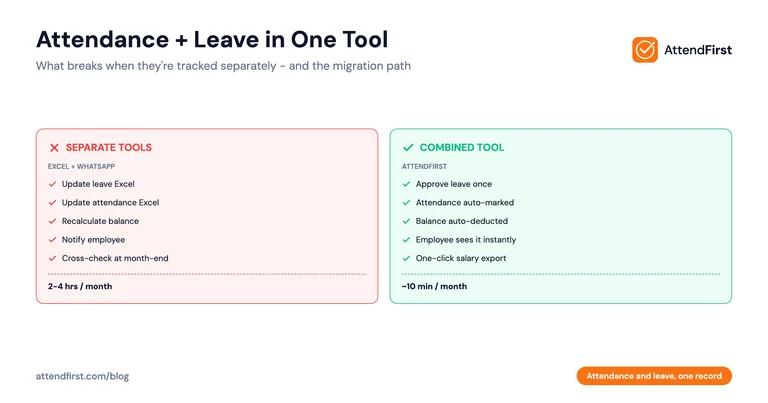
Quick comparison: separate vs combined tools
| What You Do | Separate Tools (Excel + WhatsApp) | Combined Tool (Like AttendFirst) |
|---|---|---|
| Employee takes sick leave | Two places to update | Automatic, one approval updates both |
| Monthly salary calculation | Manual cross-check (2-4 hours) | One-click export |
| Leave balance check | Scroll through WhatsApp messages | Employee sees it in the app |
| Salary disputes | Common | Rare, audit trail exists |
| Half-day leave | Manual math | Auto-calculated |
| Cost (35 employees) | Your time + disputes | ₹15,475/year |
What breaks when attendance and leave are tracked separately
Double entry
An employee requests leave on WhatsApp. You reply “OK.” Now you need to:
- Update the leave Excel, mark it as approved
- Update the attendance Excel for those dates, mark “on leave” not “absent”
- Remember to deduct from the leave balance
- Notify the employee of the new balance
Most owners do step 1 and sometimes step 2. Steps 3 and 4 get skipped. By month-end, the two files do not match.
Absent vs leave
Ravi is sick on Tuesday. Sends WhatsApp. Owner says OK. Owner updates the leave Excel but forgets the attendance Excel. At salary time, attendance shows Ravi as “absent” on Tuesday. Salary gets deducted. Ravi complains. Owner checks WhatsApp, sees the approved request, refunds the deduction. (For the underlying SL vs CL distinction that decides the deduction, see sick leave vs casual leave in India.)
This happens every month in some form across Indian SMBs.
Half-day math that never adds up
Priya takes a half-day on Wednesday afternoon for a doctor’s visit. Owner marks 0.5 in the leave Excel. The attendance Excel has “P” (present) for the morning and blank for the afternoon. How many days is that worth? 0.5 or 1? Excel does not know. You do manual math. Sometimes you round up, sometimes down. Different employees get different treatment.
Broken balance formulas
Employee asks “How many PL days do I have left?” You say “Let me check.” You open the leave Excel. The formula is broken because someone added a row last month. You give a wrong answer. Three months later, the employee tries to take leave you said was available, and it is not. Dispute.
No audit trail
Someone says they took leave last month. You do not remember approving it. You search WhatsApp. The message is gone because your phone storage ran out. Now you have no audit trail. Salary decision becomes a guess.
Split shifts make it worse
A retail shop owner with split shifts (morning and evening) has even more trouble. The attendance Excel tracks who was present in which half. The leave Excel only tracks full days or half days. Reconciling across the two during month-end is guesswork. (See the daily attendance tracking guide for the underlying tracking method this assumes.)
The hidden cost of Excel + WhatsApp
Here is where the time and money go for a 35-employee Pune retail chain owner over 18 months.
Monthly time cost
| Activity | Time Per Month |
|---|---|
| Compiling attendance from store managers | 2 hours |
| Processing leave requests on WhatsApp | 1.5 hours |
| Updating attendance Excel with leave dates | 1 hour |
| Reconciling attendance and leave Excels | 1.5 hours |
| Fixing formula errors in leave Excel | 0.5 hours |
| Handling salary disputes | 1-2 hours |
| Total | 7.5-8.5 hours |
At even a low valuation of owner time (₹300/hour), that is ₹2,250-2,550 per month, or ₹27,000-30,600 per year. Plus the stress.
The dispute tax
Over 18 months, this owner had:
- 4 salary disputes from attendance errors
- 2 disputes from leave balance confusion
- 1 resignation where the employee claimed unpaid leave encashment with no audit trail. Owner paid ₹8,000 to close it
Total dispute cost: roughly ₹18,000-25,000 over 18 months.
Opportunity cost
The 8 hours a month this owner spent reconciling data is 8 hours not spent on store operations, staff training, or finding the next location.
Put attendance and leave in one record → One tool for attendance and leave. Automatic reconciliation. Monthly export in one click. Start free
What integration actually means
Here is what the data flow looks like when attendance and leave live in the same tool.
Data flow: leave request approved
- Employee submits a leave request in the app, selects type (PL/SL/CL), dates, half-day option
- Manager gets a push notification
- Manager taps “Approve”
- The system automatically:
- Deducts the days from the employee’s leave balance for that type
- Marks the employee’s attendance record for those dates as “on leave”
- Excludes those dates from “absent” calculations
- Logs the approval with timestamp and manager name
- Notifies the employee of the decision
- Updates the month-end salary report
No manual second entry. No Excel file to update. No WhatsApp trail to search. (Companion read: our leave management software guide for Indian small businesses.)
Data flow: employee didn’t check in
- Employee does not check in by 10 AM (shift start 9 AM)
- The system flags the employee as “missing check-in” on the dashboard
- Manager checks: did this employee have approved leave? The system knows. If yes, no flag. If no, it stays flagged.
- Manager can add a manual check-in for exceptions (phone dead, forgot) or mark as absent
This is the part Excel cannot do: automatically cross-check “absent today” against “leave approved today.” The daily attendance report shows the result of that cross-check every morning - on-leave employees appear as on leave, not absent.
Data flow: month-end salary export
- Owner clicks “Export monthly report”
- The system produces a single Excel file with:
- Days present (by employee)
- Days on approved leave (by leave type)
- Days absent (not on leave, no check-in)
- Half-days (correctly counted as 0.5)
- Late arrivals (if configured)
- File goes to the CA for salary processing
No reconciliation. No manual math. The data is already consistent because it came from one source.
How to migrate from Excel + WhatsApp to an integrated tool
You don’t have to wait for a new financial year to switch. A clean migration takes 1-2 hours for a 30-50 employee business.
Step 1: Export your current data
From your attendance Excel, note:
- Current month’s attendance per employee
- Total days present year-to-date per employee (if you are mid-year)
- Working days for the cutover month - use our free working days calculator to count weekday-minus-state-holidays accurately for your state
From your leave Excel or WhatsApp:
- Each employee’s current PL, SL, CL balance
- Any pending leave requests
Step 2: Choose your start date
Pick the 1st of the next month as your cutover date. Before that date, Excel is truth. From that date, the new tool is truth. Don’t run both in parallel. That creates confusion.
Step 3: Set up the new tool
In the integrated tool:
- Add your employees with phone numbers and department
- Configure leave types (PL, SL, CL) with annual quotas
- Enter each employee’s opening balance as of the cutover date
- Set shift timings and working hours
- Add your locations or stores
- Assign managers for approval routing
Step 4: Run a training day
One hour is enough for a 35-employee business. Show employees:
- How to check in on their phone
- How to request leave (pick type, dates, reason, half-day toggle)
- How to see their leave balance
- What happens when the manager approves
Step 5: First week support
In the first 3-5 days, keep your old Excel open in parallel just to spot any mistakes. Don’t use it as the source of truth. Use it only to verify. By the end of week 1, close it.
Step 6: Archive the old files
Keep the old Excels and WhatsApp history in a safe folder for 12 months. You will not need them, but occasionally a year-end audit may reference them. After 12 months, archive.
What to look for in a combined attendance and leave tool
Not every tool that claims “attendance + leave” integrates them. Here is what to check before signing up.
| Must-Have | Why It Matters |
|---|---|
| Approved leave auto-marks attendance | Removes the double-entry problem |
| One dashboard shows attendance + leave | You see everything for one employee in one place |
| Half-day support that computes 0.5 | No manual math at month-end |
| Pro-rated balance for mid-year joiners | Fair to new employees, no Excel formula |
| Separate PL, SL, CL tracking | State Shops & Establishments Act compliance |
| Manager approval workflow | Audit trail, no WhatsApp confusion |
| Monthly export in one click | Salary data goes straight to CA |
| Free plan to try | Don’t commit until you see it work with your team |
| GPS or selfie check-in | Prevents buddy punching without hardware |
| Works on employee’s personal phone | No company devices needed |
Tools that fail: some free plans limit you to one leave type (like Kredily’s 1 leave rule). Others have attendance and leave as separate modules that don’t sync (you still do manual reconciliation). Check carefully before committing.
Real scenario: 35-employee Pune retail chain
Meet Vikram (not his real name). Vikram runs a 3-outlet retail chain in Pune selling ethnic wear. 35 total employees across Kothrud, Baner, and Viman Nagar. Peak hiring in September-November, high turnover in January.
Before: the old system
- Attendance tracked in one Excel file per store, compiled monthly by the store managers
- Leave requests on WhatsApp to Vikram directly
- Vikram maintained a master leave Excel on his laptop
- Month-end: cross-check both files, send to CA
The breaking point
In November 2025, during peak season:
- 2 new hires joined mid-month. Their leave balance was not pro-rated in the Excel.
- Vikram approved 3 leave requests on WhatsApp in a single chaotic afternoon. He only updated 2 in the master Excel.
- A store manager in Baner reported attendance inconsistencies: 2 employees marked absent on days Vikram had actually approved leave.
- Salary for November took 5 hours to finalise instead of the usual 2.5.
- One employee quit citing “confusion and unfair deductions.” He came back later when Vikram showed him the corrected record, but the trust was damaged.
The switch
In December 2025, Vikram moved to a combined tool. Setup took 90 minutes total:
- 35 employees added with phone numbers
- 3 store locations configured
- PL (12), SL (8), CL (7) leave types configured
- Each employee’s opening balance entered from the old Excel
- One training session with all store managers
After: 3 months later
- Month-end salary run: 25-30 minutes (down from 2.5-5 hours)
- Leave disputes: zero
- Attendance disputes: one, caused by an employee forgetting to check in. Resolved with manual entry by store manager
- Time freed up: ~8 hours per month
- Cost: ₹3,000 for the first 10, then 25 x ₹499 = ₹15,475/year
Vikram said the biggest surprise was not the time saved. It was not having to remember things. “I used to carry the leave file in my head. Now I don’t. If someone asks their balance, I tell them to open the app.”
Common questions from SMB owners
My staff don’t use apps. Will this work for them?
In 2026, almost every retail, clinic, and factory worker in India has a smartphone with WhatsApp. If they can use WhatsApp, they can use a simple attendance app. For the 1-2 exceptions, use a QR code at the store entrance or let the manager add manual entries for them.
What if the internet is slow at my store?
A check-in needs only a few KB of data, less than sending a WhatsApp message. It uses the employee’s mobile data, not the store Wi-Fi. Most combined tools also support offline check-in that syncs when connection returns.
Can I keep using Excel in parallel while I try the new tool?
For the first 3-5 days, yes. Keep the old Excel open to spot differences and build confidence. After that, commit fully. Running two systems creates confusion and defeats the point.
What about historical data? Do I lose it?
No. Your old Excel files stay on your laptop. Most combined tools let you enter opening balances as of the cutover date, so year-to-date leave and attendance totals carry over. Historical data stays in Excel for reference if needed.
Is this cheaper than the current mess?
For most SMBs with 20+ employees, yes, significantly. At ₹499/employee/year above 10 and 8 hours of owner time saved per month, the cost is recovered in the first week. AttendFirst is free for the first 3 employees, so if you have 3 or fewer, it is completely free.
What happens if the tool goes down?
Good tools have 99.9% uptime. For the rare downtime window, you can record attendance manually on paper for the day and enter it later. Same as you do today with Excel when your laptop is broken.
Can different managers approve leave for different teams?
Yes. Good combined tools support reporting structures. Assign each employee to a manager, and leave requests route to that manager automatically. For multi-store retail, each store manager handles their own team.
Setup checklist
- Export current leave balances from Excel or WhatsApp
- Pick a cutover date (1st of next month)
- Choose a combined tool with free plan to try
- Add employees, locations, shifts, leave types
- Enter opening balances
- Assign managers for approval routing
- One-hour training for employees and managers
- Keep old Excel as reference for 3-5 days
- Run first month-end export
- Archive old files after 12 months
Stop running two Excel files that never match. Put attendance and leave in one record → Attendance and leave in one tool. Auto-reconciled. Monthly export in one click. Made for Indian SMBs on registers, WhatsApp, and broken spreadsheets.
Payal Sharma has a background in field operations with small businesses across Pune, Coimbatore, and Jaipur. This post comes from sitting with owners at month-end as they reconcile two Excel files that never match (one for attendance, one for leave) and rebuild salary runs from scratch.
Frequently asked questions
Why is tracking attendance and leave in the same tool better than separate Excel files?
When leave is approved, attendance updates automatically. No double entry, no mismatches, no salary disputes at month-end. A 35-employee SMB saves 7-8 hours of reconciliation time per month.
My staff don't use apps. Will a combined tool work for them?
Almost every retail, clinic, and factory worker in India has a smartphone with WhatsApp in 2026. If they can use WhatsApp, they can use a simple attendance app. For the 1-2 exceptions, use a QR code at the store entrance or manual entries by the manager.
Can I keep using Excel in parallel while I try the new tool?
For the first 3-5 days yes, keep the old Excel as a reference to spot differences. After that, commit fully to the new tool. Running two systems forever defeats the purpose and causes confusion.
What happens to my historical attendance and leave data when I switch tools?
Your old Excel files stay on your laptop. Most combined tools let you enter opening leave balances at the cutover date so year-to-date totals carry over. Historical data stays in Excel for reference if needed for audits.
How much does a combined attendance and leave tool cost for a 35-employee SMB?
AttendFirst is free for the first 3 employees, ₹3,000/year for teams of 4-10, and ₹499/year per employee above 10, so a 35-employee business pays about ₹15,475/year. Cheaper than one month of most HR suites, and less than the time cost of running two Excel files.
Can different managers approve leave for different teams?
Yes. Good combined tools support reporting structures. Each employee is assigned to a manager, and leave requests route to that manager automatically. Multi-store retail chains can have store-level managers handling their own team's approvals.
Get attendance tips for Indian businesses
One practical guide per week. No spam.
Put attendance and leave in one record
Indian holidays and weekly offs come already loaded. Setup takes 5 minutes, and no payment is required to start.