Attendance App for Small Business
With Leave in the Same Record.
Your staff check in from their own phones with GPS, a selfie, or a QR code. Leave requests, balances, holidays, and weekly offs sit in the same record, so the day count you pay from matches the days people worked.
Teams of 4-10 pay a flat ₹3,000 a year. Every feature is on every plan.
No payment required to start. On iPhone, add it to your home screen from Safari.
What is AttendFirst?
AttendFirst is an attendance and leave app for Indian businesses. Employees check in from their own phones with GPS, a selfie, or a QR code. Leave requests, balances, Indian holidays, and weekly offs are kept in the same record as those check-ins.
- Choose it if: you keep attendance in a register or Excel and leave in WhatsApp, and you want one record you can defend when someone disputes a salary.
How an employee checks in on the phone
The employee screen has one main button. Owner setup has three steps: add employees by hand or share a join link on WhatsApp, draw the workplace on a map, and choose which checks apply.
- 1
Open the app and tap Check In
The first tap asks for location permission. With selfie on, the front camera opens for a photo. Otherwise the check-in is recorded on that tap.
- 2
Or scan the QR code at the workplace
Point the phone camera at the printed code or the tablet, then confirm check-in or check-out.
- 3
Tap Take Break, then End Break
The day shows as sessions: Work, then Lunch Break, then Work again. Break minutes stay apart from work minutes.
- 4
Tap Check Out
If an employee forgets, the session stays open until the location's maximum session length, and the admin can close it.
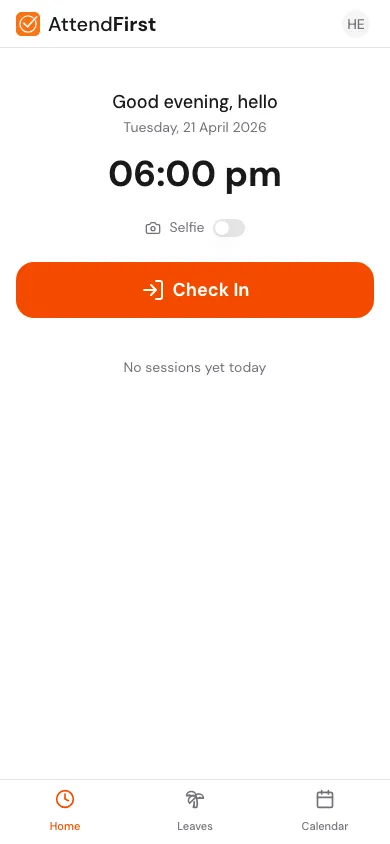
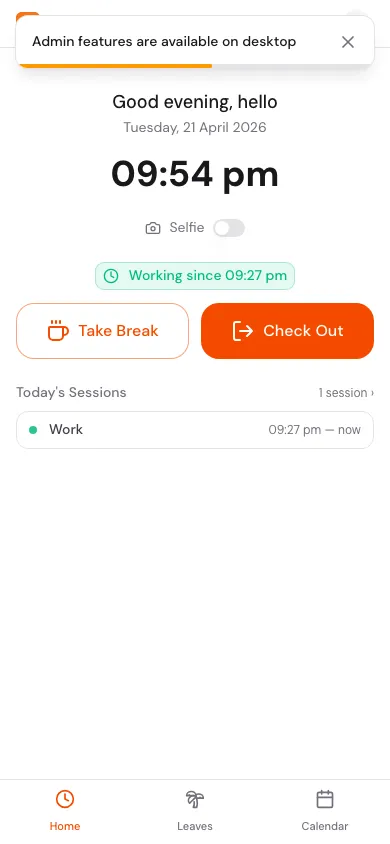
The screenshots use a demo company. The check-in guide walks through each screen.
GPS, selfie, and QR check-in
You choose which checks apply at each location. A shop can use QR alone, and a field team can use GPS (Global Positioning System) location with a selfie.
GPS check-in
The phone sends its location with the check-in. You set a geofence radius for each workplace. A check-in outside the radius is tagged unverified, and you can filter those in reports. It is never blocked, so a worker with a weak signal can still record the day.
Selfie check-in
Turn selfie on for a location and the front camera opens at check-in. The photo is stored with the record. Selfie is off by default. The admin can review the photo later.
QR check-in
Print a static QR code for the wall, or show a rotating code on a spare tablet that refreshes every 15 seconds to 5 minutes. Employees scan it with their own phones. Each code belongs to one location.
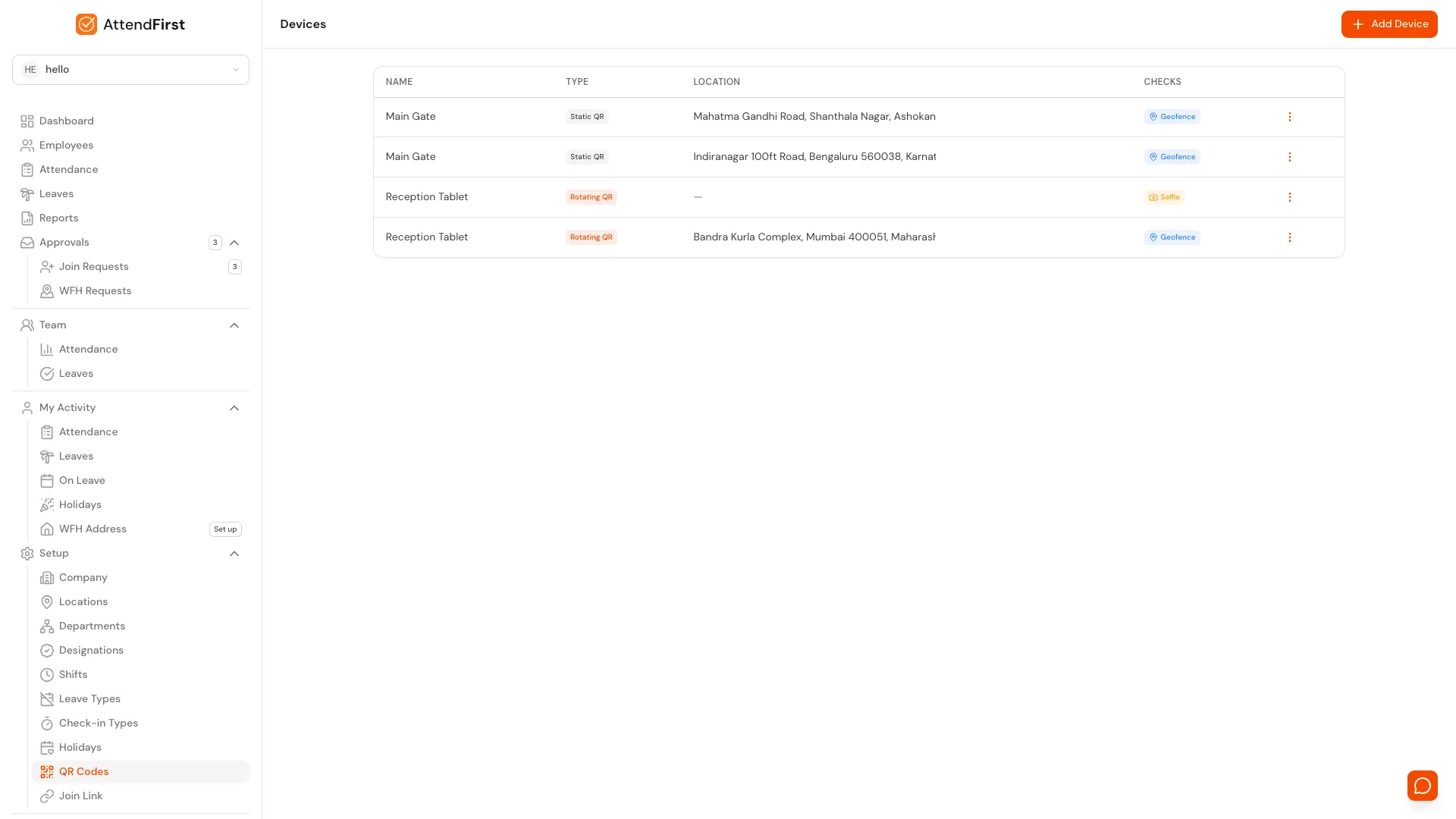
A static QR code can be photographed and shared, so it proves less than a rotating code does. If a printed code leaks, rotate its token and the old code stops working. Read how it works in the QR attendance guide and the post on QR code attendance in India.
Split shifts, night shifts, and breaks
Shops, outlets, and restaurants often split the day or run past midnight. These are the shift patterns AttendFirst records.
- A shift holds 1 to 4 timings, such as 08:00 to 13:00 and 16:00 to 21:00. The gap is off the clock, and a late return marks the day Late.
- A 22:00 to 06:00 night shift works. An overnight shift records against the date it started.
- Each day holds more than one session, so a lunch break or a site visit does not break the record.
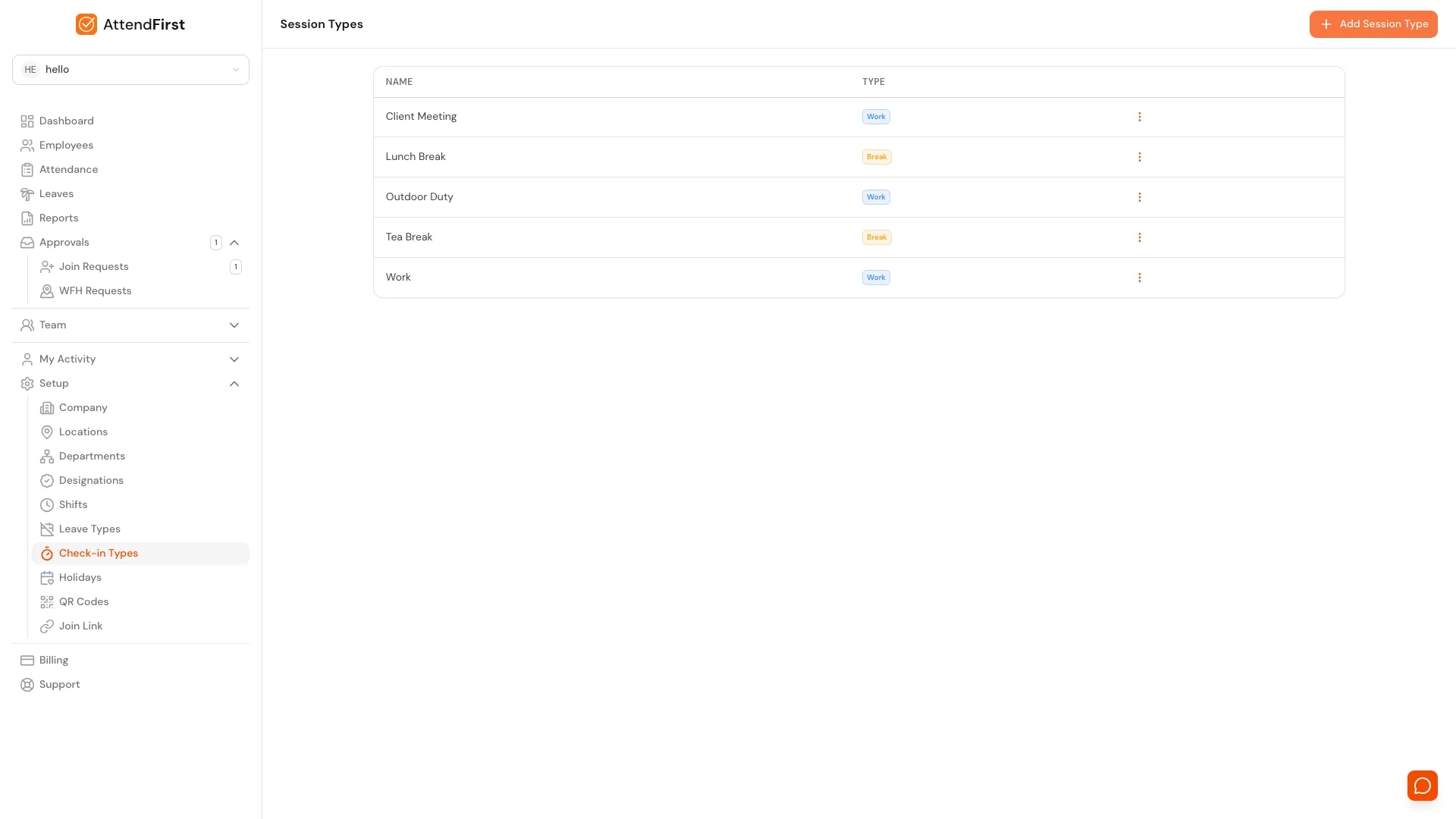
- Lunch Break and Tea Break come preloaded. Add your own, and set a separate GPS or selfie rule for any type.
- Give one person a custom shift without changing the company default.
- Set the worked minutes that make a Full day, Half day, or Short day.
Attendance and leave in one record
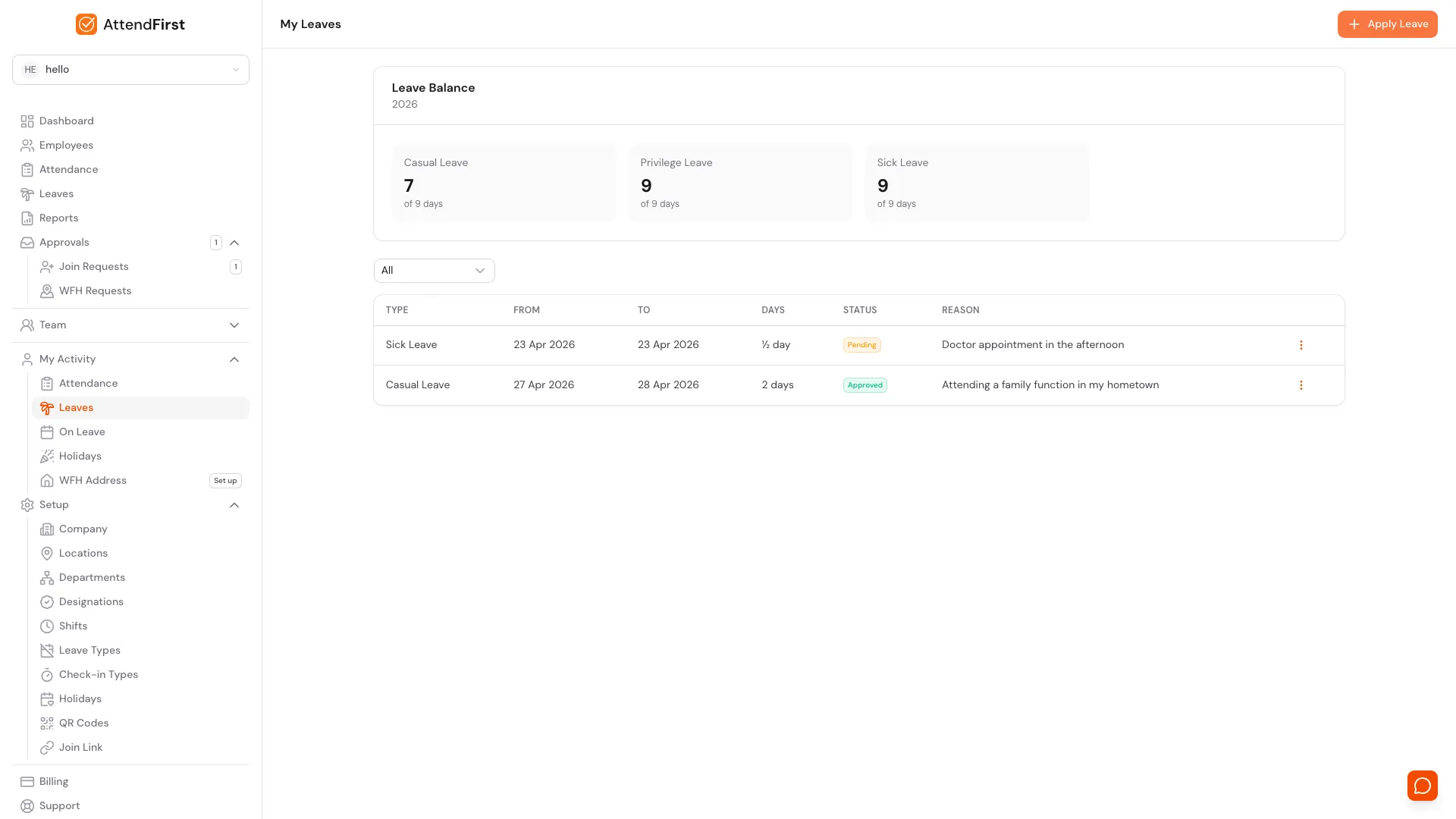
In many small businesses, the register records who came in and a WhatsApp thread records who asked for leave. At month-end nobody can reconcile the two. In AttendFirst, an approved leave day appears in the attendance record, so the count matches.
- → Casual, Privilege, and Sick leave types come preloaded, and you can add your own.
- → Half-day leave counts as 0.5 day against the balance.
- → Quotas are pro-rated for employees who join mid-year.
- → A holiday or weekly off inside a leave range does not use up the balance.
- → A holiday template of about 20 Indian gazetted holidays loads in one click, with floating dates such as Diwali, Holi, and Eid updated each December.
- → You set the working days of the week and the shift for each day, so Sunday can be a weekly off. For alternate Saturdays, mark the off Saturdays as company holidays.
- → A manager approves leave for the people who report to them, and an admin can approve anyone.
- → Every approved leave shows on one shared calendar with holidays and weekly offs.
A balance is the annual quota minus approved days, and it resets on 1 January. Read the post on attendance and leave integration and the guide to attendance registers under the labour codes.
What the attendance app costs
Teams of 4 to 10 pay a flat ₹3,000/year. From the 11th employee, ₹499 per employee per year. Up to 3 employees is free, forever.
Billing is annual. No payment is required to start.
| Team size | Cost per year |
|---|---|
| 5 employees | ₹3,000 |
| 8 employees | ₹3,000 |
| 12 employees | ₹3,998 |
| 25 employees | ₹10,485 |
See the pricing page for the full plan details.
AttendFirst compared with four alternatives
We read each price on the vendor's own pricing page. Prices checked on 19 October 2026. Vendors change prices, so confirm before you buy.
| AttendFirst | PagarBook | SalaryBox | Kredily | Keka | |
|---|---|---|---|---|---|
| Annual cost for 8 employees | ₹3,000 flat | See website | ₹18,792 (Starter) or ₹38,880 (Business) | ₹20,988 (Professional, monthly rate x 12) | See website |
| How the vendor prices it | Flat band, then per employee | Per staff per year, three-year option, GST extra | Monthly base fee plus per user, quarterly billing | Monthly price up to 25 employees, then per employee | See website |
| GPS and selfie | Every plan | Listed as selfie and location attendance | Every plan | Professional and Enterprise only | See website |
| QR check-in | Every plan | See website | Every plan | See website | See website |
| Leave | Same record as attendance | Leave management listed | Requests and holidays on Starter. Accrual and approval flow on Business | Leave on Free; unlimited leave rules on Professional | Part of the payroll product |
| Free option | Up to 3 employees | Marking attendance is free, per its page | None listed | Unlimited employees, no selfie or GPS | No free plan listed |
Sources, all read on 19 October 2026: pagarbook.com/pricing, salarybox.in/pricing, kredily.com/pricing, keka.com/pricing.
SalaryBox figures use the quarterly-billing prices it displays: Starter ₹1,350 a month plus ₹27 per user a month, Business ₹2,700 plus ₹67.5, with taxes extra. Its list prices before the quarterly discount are higher. The table shows 8 employees.
Kredily's Professional plan is ₹1,749 a month for up to 25 employees, then ₹70 per employee a month. Its Free plan has unlimited employees, a mobile app, and web clock-in attendance; selfie and GPS attendance are in Professional. The table multiplies the monthly rate by 12 and does not apply any yearly discount.
PagarBook sells App, App plus Web, and Classic Suite plans per staff per year, excluding GST. Keka shows no prices and mentions a setup fee without an amount.
Features and prices change. Check each provider's website for the latest plans and prices.
Frequently asked questions
What is the best attendance app for a small business in India?+
It depends on what you need to record. AttendFirst fits a business that wants attendance and leave in one record, with Indian holidays and weekly offs already set up, on the phones staff already carry. The comparison table on this page lists prices and features for PagarBook, SalaryBox, Kredily, and Keka. Teams of 4 to 10 pay a flat ₹3,000/year. From the 11th employee, ₹499 per employee per year. Up to 3 employees is free, forever.
How does an employee mark attendance on this app?+
The employee opens AttendFirst on an Android phone from Google Play, or in a mobile browser, and taps Check In. The app records the time and the phone's location, and asks for a selfie if the admin turned selfie on. The employee can also scan a printed or tablet QR code at the workplace. Take Break and Check Out sit on the same screen.
Does the attendance app use GPS, selfie, or QR codes?+
All three. GPS compares the check-in location with a geofence you draw around each workplace. A selfie is an optional photo taken at check-in. A QR code is a static printed code or a rotating code on a tablet. You choose which checks apply to each location. All three are on every plan.
Does the app support split shifts and breaks?+
Yes. A shift can have 1 to 4 timings, such as 08:00 to 13:00 and 16:00 to 21:00, and the gap between them is off the clock. Employees tap Take Break to start a break session, such as Lunch Break or Tea Break. Break minutes are tracked apart from work minutes.
Is attendance linked to leave?+
Yes. Attendance and leave sit in one record. An approved leave day shows as on leave in the attendance record, a half-day leave counts as half a day against the balance, and holidays and weekly offs do not count against the balance. The admin sees who is in, late, and on leave on one screen.
How much does the attendance app cost?+
Teams of 4 to 10 pay a flat ₹3,000/year. From the 11th employee, ₹499 per employee per year. Up to 3 employees is free, forever. Billing is annual. No payment is required to start.
What if some staff do not have a smartphone?+
An employee needs a phone with a browser to check in or scan the QR code. For someone without one, an admin can enter attendance by hand under manual attendance.
Is there an iPhone app?+
There is an Android app on Google Play. On iPhone, open app.attendfirst.com in Safari, tap Share, and tap Add to Home Screen. It then opens full screen like an app.
Can I export attendance for payroll?+
Yes. You can export attendance and leave from Reports as a spreadsheet for your accountant or payroll software.
Try it with your team today
Every feature is on every plan, including the free one. No payment required to start.