Attendance App Rollout Checklist: 7 Steps for Indian SMBs
Arjun researches attendance, leave, and workforce trends for Indian small businesses. He writes data-driven comparisons and guides.
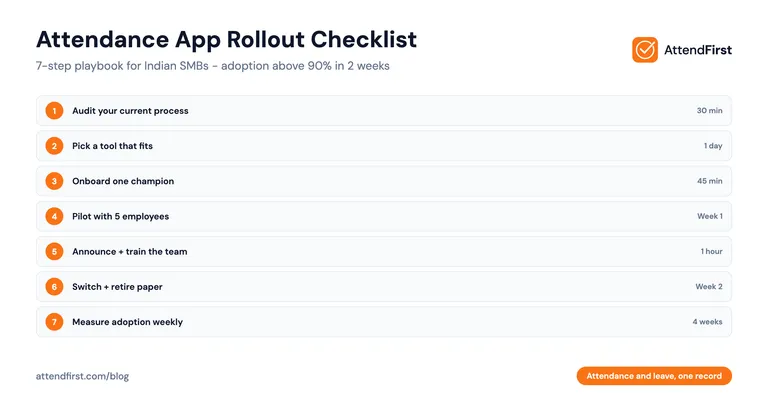
TL;DR: Most attendance app rollouts in Indian SMBs fail not because of the tool, but because of the rollout. A 7-step checklist with a small pilot, one internal champion, and clear deadlines gets adoption above 90% in two weeks.
- Audit your current process before picking a tool
- Pilot with 5 employees, not 50
- Train one champion, not every employee
- Measure adoption weekly for the first month
Why Do Attendance App Rollouts Fail in Indian SMBs?
A business owner installs a shiny new attendance app on Monday. By Friday, half the team is still signing the register. By month-end, the app is abandoned. Sound familiar?
This happens at most companies, and the reason is almost never the app. It is the rollout. Here is what goes wrong:
Resistance from senior employees. The old guard sees a new app as a trust issue. “I have worked here 8 years, now you want to track me?” Nobody addresses this up front.
No training. The owner sends a link on WhatsApp with “install this.” Half the team can’t figure out how to allow camera permission. They give up.
Unclear expectations. Employees don’t know the last day of paper attendance. They keep using both. The data becomes messy.
No champion. The owner can’t be everywhere. Without one trusted employee who knows the app well, nobody has anyone to ask.
Wrong tool for the team. The chosen app requires a Play Store download, but half the employees have low-storage phones. They can’t install it.
The good news: every one of these failures is preventable with a clear rollout plan. Here is a 7-step checklist that works for SMBs from 10 to 100 employees.
Step 1: Audit Your Current Process
Before you pick an app, write down what you do today. Seriously, write it down. This takes 30 minutes and saves weeks of confusion later.
Answer these questions on paper:
- How do employees mark attendance right now? (register, Excel, nothing)
- Who collects the data at month-end?
- How long does payroll take to compile attendance?
- What disputes have come up in the last 6 months?
- Which employees work at a fixed location vs which move between sites?
- Do any employees work from home, even one day a week?
- What is the monthly cost of your current process? Include owner and manager time.
The last answer is the important one. Most SMB owners think paper attendance is “free.” But if your office manager spends 6 hours per month compiling data, and her time costs ₹300 per hour, your “free” attendance costs ₹1,800 per month. That is ₹21,600 per year.
Now you know your real budget.
Step 2: Pick the Right Method for Your Team
Not every attendance method fits every Indian SMB. Pick based on your actual work pattern, not what a sales call suggested.
Use this quick matrix:
| Your Team Pattern | Best Method |
|---|---|
| 10-30 employees, single office | Selfie + GPS app |
| Field staff (sales, delivery, security) | Selfie + GPS app |
| Multiple branches | Selfie + GPS app |
| Factory with 100+ workers, fixed site | Biometric machine or QR code |
| WFH or hybrid team | Selfie-only app |
| Mix of the above | App with multiple check-in methods |
For most teams in the 10-75 employee range, a selfie + GPS app is the answer. It costs ₹0 to ₹499 per employee per year, needs zero hardware, and works for both office and field staff. For a detailed breakdown, see our selfie vs biometric attendance comparison.
Step 3: Train One Internal Champion
This step is skipped by every failed rollout. Don’t skip it.
Before the full team sees the app, pick one employee who will become your attendance champion. This person should be:
- Reasonably comfortable with smartphones
- Respected by peers (not necessarily senior)
- Available during working hours for questions
- Patient enough to help others
The office manager, HR assistant, or a friendly supervisor usually works. Sometimes it is a helpful junior who everyone already asks for phone help.
Spend 45 minutes with your champion. Walk through:
- Creating their own account and checking in once
- Adding a new employee to the system
- Viewing today’s daily attendance dashboard
- Exporting a monthly report
- Handling a “forgot to check in” manual entry
After this, your champion is the single point of contact for the team’s questions. The owner doesn’t answer “how do I log in” 40 times.
Step 4: Run a 5-Person Pilot
Never roll out to the whole team on day one. Always pilot.
Pick 5 employees for your pilot. Mix senior and junior, office and field, tech-savvy and not. Tell them clearly: “You are the first 5 to try this. I want your honest feedback in a week.”
Run the pilot for exactly 7 days. During the pilot:
- Both paper and app run in parallel (so nothing breaks)
- The champion checks in with each pilot employee daily
- Every technical issue gets logged in a simple WhatsApp group
- The owner personally thanks pilot employees on day 7
At the end of the week, you will know three things: does the app actually work with your internet and phones, what questions are most common, and which employees will resist on day one.
See how AttendFirst pilots work - free for up to 3 employees, perfect for a pilot before full rollout.
Step 5: Gather Feedback and Fix Issues
The pilot will surface real problems. Don’t ignore them. Fix them before going wider.
Common pilot issues:
“The app doesn’t work on my phone.” Usually a storage issue (Play Store app) or an older Android version. Solution: pick a browser-based app. AttendFirst runs in any mobile browser, no install required.
“My GPS is wrong inside the building.” Indoor GPS is imperfect. Solution: use QR code check-in at a fixed location (print a QR code poster at the entrance, employees scan it).
“I can never get mobile data at my site.” Some construction sites and factories have dead zones. Solution: employees check in when they have signal, the app queues it. Check with the vendor whether offline check-in is supported.
“The manager can’t see my check-in.” Usually a permissions issue in the app settings. Quick fix, but important to spot before wider rollout.
“I don’t understand English.” A real issue across many teams. Solution: make sure the app or the onboarding flow is in the employee’s language, or have the champion explain in Hindi, Tamil, Marathi, or Bengali.
Address each issue before step 6.
Step 6: Full Rollout with Clear Dates
Now you can roll out to the whole team. The rollout should have three written deadlines that everyone knows.
- Announcement day (e.g., Monday of week 1): All employees get a message explaining what is changing, why, and the last day of paper attendance
- Onboarding day (e.g., Wednesday of week 1): A 15-minute session with all employees, led by the champion, where everyone creates their account and does a test check-in
- Paper stops (e.g., Monday of week 2): The register is physically removed. No more parallel recording. The app is now the source of truth
Share these dates in writing. WhatsApp, email, noticeboard, whatever works. Employees respect dates they can see.
On onboarding day, the owner should be present. This signals that the rollout is serious. A 2-minute speech from the owner saying “we are doing this because I want accurate payroll and to respect your time” buys more goodwill than any training video.
Step 7: Measure Adoption for 4 Weeks
Rollout isn’t done when everyone has the app. It is done when everyone uses it, daily, without reminders.
Track three numbers every Friday for the first month:
- Check-in rate. Of employees who worked today, what percentage checked in? Target: 90% by end of week 2, 95% by end of week 4
- On-time rate. Of check-ins, how many were within the scheduled window? This tells you about timing policy, not tool adoption
- Support tickets. How many “I can’t check in” questions did the champion handle this week? Should drop week over week
If check-in rate is below 90% after two weeks, something is wrong. The common causes: a subset of employees with old phones, a manager who isn’t enforcing the policy, or a confusing edge case nobody has explained.
Fix the cause, don’t just send reminders. Reminders don’t fix a broken phone.
How to Handle Employee Objections
Even with a good rollout, some employees will push back. Here is how to respond, honestly.
“You don’t trust us.” Honest answer: “This is about accurate records, not trust. Paper attendance has mistakes, and mistakes affect your salary. This is for you as much as me.”
“It is more work for us.” Honest answer: “Check-in takes 10 seconds. Signing the register takes 20 seconds. This is less work.”
“My phone is too old.” Honest answer: “We picked an app that works in a browser, no install needed. Let’s check together now.” If the phone genuinely can’t run a browser, the employee can use a shared device or a manual entry from their manager.
“What about my data?” Honest answer: “Only your manager and I can see your attendance. The app doesn’t track your location outside working hours. You can see your own data any time.”
“I don’t want my photo taken every day.” Honest answer: “The photo proves it was you, not a colleague marking for you. It is stored securely and only visible to management. It is the modern version of a signature.”
Handle these with respect, not authority. An employee who feels heard adopts. An employee who feels bullied resists for months.
India-Specific Things You Should Plan For
Regional languages. If half your team speaks Hindi and the app is only in English, adoption stalls. Either pick a multi-language app or have your champion walk through it in the employees’ language. A 10-minute Hindi or Tamil demo video solves this.
Phone availability. Some employees may share a phone with family. Plan for this. A browser-based app (no install) means employees can log in from any phone, including a spouse’s, in an emergency.
Low-tech workers. A watchman, a factory floor worker, or a cleaner may never have used an app before. For these employees, QR code check-in is the simplest path: walk up to the entrance, scan the poster, done. Some SMBs assign a supervisor to mark attendance on their behalf, which also works.
Don’t assume everyone has the same phone skills as your office staff. Plan for the range.
How to Measure Rollout Success
Four weeks in, you should be able to answer these questions with real numbers:
- Check-in rate above 95%
- Monthly payroll compilation time reduced by 70% or more
- Attendance disputes at zero
- Employees can pull their own attendance records without asking HR
- Total time spent on attendance by the owner and manager is under 2 hours per month
If you can hit these, the rollout succeeded. If not, go back to step 5 and fix the specific blocker.
FAQ
How long does a full attendance app rollout take for a 30-person SMB?
A well-run rollout takes 2 weeks end to end. Week 1 is the pilot with 5 employees plus fixing issues. Week 2 is the full rollout with announcement, onboarding day, and register removal. Measurement continues for 4 weeks after. Rushing under 2 weeks usually backfires because edge cases surface after wider rollout and erode trust in the tool.
What is the biggest mistake Indian SMBs make during attendance app rollout?
Skipping the pilot. Owners assume a well-reviewed app will just work for their team. Then a specific phone model, a spotty WiFi signal, or a confused employee creates a day-one failure that spreads by word of mouth. A 5-person pilot catches 90% of these issues before they reach the full team. It costs 7 days and saves weeks of damage control.
Do I need to pay for employee training?
No. Good attendance apps are designed for employees to figure out in under 2 minutes. The training you need is for your internal champion, which takes 45 minutes. If an app requires paid training or a sales rep visit, it is too complicated for most Indian SMBs. Pick something simpler.
What if my employees don’t speak English?
Pick an app that supports regional languages, or build your own onboarding around your champion explaining it in Hindi, Tamil, Marathi, Bengali, or whatever your team speaks. A 10-minute demo by someone the employees trust, in their language, works better than any English tutorial video. The app itself should be simple enough that language barely matters after the first day.
How do I handle employees who refuse to use the app?
First understand why. Is it a trust issue, a phone issue, or a language issue? Each needs a different response. If it is trust, the owner should talk to them personally and explain the reason. If it is phone or language, solve that. A flat refusal after all this is rare, but if it happens, you can offer manual entry with manager verification as a temporary bridge while addressing the underlying concern.
Should I run paper and app attendance in parallel forever?
No. Parallel systems create double work and data mismatches. Run them in parallel only during the 7-day pilot and then for 2-3 days of the full rollout as a safety net. After that, the register must go away completely. If you keep it around “just in case,” employees will use it whenever the app feels inconvenient, and your data becomes useless for payroll.
What if my rollout fails and I want to revert?
If after 4 weeks adoption is still under 70%, pause and diagnose. Don’t revert yet. Talk to 5 employees individually about what is blocking them. Usually it is one specific issue (bad WiFi at one location, confusion about timing, a specific phone model). Fix that issue, re-announce, and give it another 2 weeks. Full reverts are almost never necessary. The cost of going back to paper is higher than fixing the rollout.
Arjun Desai writes step-by-step guides for AttendFirst, where attendance and leave live in one record. He believes a good rollout is worth more than a fancy tool, and has walked dozens of Indian SMBs through their first month on a new attendance system.
Start your attendance rollout free - AttendFirst is free for up to 3 employees, ₹3,000/year for teams up to 10, and ₹499 per employee per year above that, with no contracts and no setup fees.
Frequently asked questions
How long does a full attendance app rollout take for a 30-person SMB?
A well-run rollout takes 2 weeks end to end. Week 1 is the pilot with 5 employees plus fixing issues. Week 2 is the full rollout with announcement, onboarding day, and register removal. Measurement continues for 4 weeks after.
What is the biggest mistake Indian SMBs make during attendance app rollout?
Skipping the pilot. Owners assume a well-reviewed app will just work. Then a specific phone model, spotty WiFi, or a confused employee creates a day-one failure that spreads by word of mouth. A 5-person pilot catches 90% of these issues.
What if my employees do not speak English?
Pick an app that supports regional languages, or have your internal champion run onboarding in Hindi, Tamil, Marathi, or Bengali. A 10-minute demo by a trusted colleague in the employees' language works better than any English tutorial video.
Should I run paper and app attendance in parallel forever?
No. Parallel systems create double work and data mismatches. Run them in parallel only during the 7-day pilot and for 2-3 days of full rollout as a safety net. After that the register must go away completely.
What if my rollout fails and I want to revert?
If adoption is still under 70% after 4 weeks, pause and diagnose. Do not revert. Talk to 5 employees individually about what is blocking them. Usually it is one specific issue (bad WiFi, timing confusion, specific phone model). Fix that and give it another 2 weeks.
Do I need to pay for employee training?
No. Good attendance apps are designed for employees to figure out in under 2 minutes. The training you need is for your internal champion, which takes 45 minutes. If an app requires paid training, it is too complicated for most Indian SMBs.
Get attendance tips for Indian businesses
One practical guide per week. No spam.
Put attendance and leave in one record
Indian holidays and weekly offs come already loaded. Setup takes 5 minutes, and no payment is required to start.