Work-From-Home Attendance Tracking in India (2026)
Arjun researches attendance, leave, and workforce trends for Indian small businesses. He writes data-driven comparisons and guides.
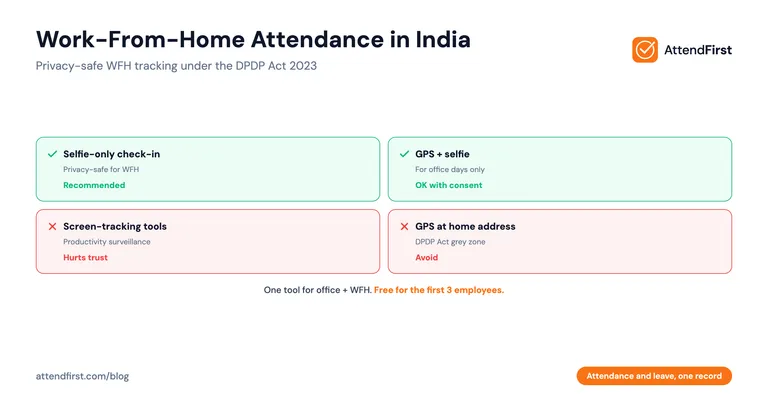
TL;DR: Work-from-home attendance in India works best with trust-based, timezone-aware check-in windows and a simple selfie proof. Skip VPN logs, screen trackers, and forced GPS for home workers.
- Use flexible check-in windows, not fixed 9 AM deadlines
- Avoid GPS tracking at home addresses (privacy risk)
- Selfie check-in solves identity without surveillance
- Hybrid teams need one tool for office and WFH days
What Makes Work-From-Home Attendance Different?
What counts as “attendance” when an employee works from their home in Pune instead of the office in Bengaluru? The answer changes how you track it.
In an office, attendance means physically present at a location. At home, that definition breaks. Nobody walks through a door. There is no biometric machine to tap. The manager can’t glance across the room.
So attendance for WFH teams has to track something different: availability during work hours, not physical location.
This shift trips up most Indian SMBs that rush to install office-style tracking on remote employees. It creates friction, kills trust, and still doesn’t solve the real problem.
Why Do Most WFH Tracking Methods Fail?
Here is what typically gets tried, and why each one breaks down.
VPN login logs. Some IT companies track when an employee connects to the company VPN. The problem: VPNs drop, reconnect, and lag. An employee can be working on a Google Doc outside the VPN for four hours. The log says absent. The work says present.
Productivity trackers. Tools that screenshot the screen every 10 minutes or count keystrokes feel invasive. Indian employees talk. One screenshot tracker on a team of 15, and your best developers quietly start interviewing elsewhere. The cost of lost talent is much higher than the cost of a missed check-in.
Forced GPS at home. Some apps demand GPS location even from WFH employees. This records the employee’s home address, permanently, on a company server. It is a privacy red line. Don’t cross it.
“Just WhatsApp us when you start.” This works for three employees. At 12 employees, the manager drowns in 12 “good morning” messages daily, forgets to log them, and by month-end nobody knows who worked when.
None of these solve the real question: was this employee available and working during their declared hours?
What Works for WFH Attendance
Indian IT services companies, digital agencies, and content teams that have figured out WFH attendance tend to land on the same setup.
1. Flexible Check-In Windows
Fix the workday, not the exact minute. A software team might have a check-in window from 9:00 AM to 11:00 AM. Any check-in inside that window counts as on-time. This respects real life: the power cut, the delayed delivery, the school drop-off.
Rigid 9:00 AM deadlines for remote employees create a culture of lying. Employees check in at 8:58 AM and then go back to sleep. Flexible windows create a culture of honesty.
2. Selfie-Only Check-In (No GPS)
A selfie proves identity. That is the only thing you need to verify for a WFH employee. You don’t need to know which room they are in. You don’t need their home pincode. (Selfie vs biometric attendance covers why a phone-based selfie beats fingerprint scanners on cost and reach.)
A one-tap selfie check-in tells you: this employee, on this day, at this time, started work. That is enough.
3. Timezone Awareness
If your content team has a writer in Guwahati and a designer in Kochi, their local times are the same, but their morning routines might not be. More importantly, if you have a remote employee in Dubai or Singapore on an Indian payroll, fixed IST windows punish them for doing their job.
A good WFH attendance system stores check-in time in the employee’s local timezone and shows both to the manager. (For the in-office equivalent, see the daily attendance tracking guide.)
Privacy: Why GPS at Home Is a Red Line
Most Indian SMBs haven’t thought about this carefully. They should.
When you enable GPS tracking for a home-based employee, you are recording their residential address on your company database. Every single workday. For years.
Think about what that means in practice:
- If your database is leaked or hacked, employee home addresses are exposed
- If an employee leaves on bad terms, that record doesn’t automatically delete
- Under India’s DPDP Act (2023), employee home location counts as personal data that needs explicit, informed consent
- You can’t demand this consent as a condition of employment without legal risk
The simple fix: don’t collect home GPS. For WFH employees, a selfie is enough. For office days, GPS is fine because the office is a business address.
Start tracking WFH attendance free - AttendFirst has selfie-only check-in built in, no GPS required for remote employees.
How Does This Work for Hybrid Teams?
Most Indian IT SMBs in 2026 run hybrid: two days in office, three days WFH, or some variation. One tool needs to handle both.
Here is how the setup works in AttendFirst, step by step:
- Create the company and add employees. Standard onboarding, takes 5 minutes
- Set the attendance policy per employee. Mark each one as “office,” “WFH,” or “hybrid”
- For hybrid employees, define office days. For example: Tuesday and Thursday are office, rest are WFH
- On office days, check-in uses GPS + selfie. Verifies they are at the office
- On WFH days, check-in uses selfie only. No GPS captured
- Reports show both modes. The manager sees which days were in-office vs remote
The employee doesn’t need to toggle anything. The app knows today’s expected mode from the policy.
Which Indian Industries Need This?
The WFH model is now normal for several SMB segments in India. Each has a specific pattern.
IT services companies (10-100 employees). Developers, QA, and DevOps often work from home 3-5 days a week. Client delivery matters, not office seat time. Selfie check-in plus work tracking in Jira is enough.
Digital marketing agencies. Content writers, SEO specialists, and graphic designers produce deliverables. Attendance is about being available during client hours, not location.
Content and media teams. Podcast editors, YouTube producers, and newsletter writers work asynchronously. A morning and evening check-in window is all you need.
Customer support teams. Remote support agents in tier-2 cities working for a Bengaluru company. Here, shift start time does matter, but selfie is still the right proof.
Remote-first startups. 5-30 person teams spread across India. No office at all. Pure trust-based attendance with simple identity proof.
Comparison: WFH Attendance Methods
| Method | Privacy Safe | Verifies Identity | Easy to Set Up | Works for Hybrid | Cost |
|---|---|---|---|---|---|
| Selfie check-in | Yes | Yes | Yes | Yes | ₹0 to ₹499/emp/year |
| GPS at home | No | No | Yes | Yes | ₹0 to ₹499/emp/year |
| VPN login logs | Yes | Weak | No | No | Infra cost |
| Screen/keystroke tracker | No | Weak | No | No | ₹500+/emp/month |
| WhatsApp message | Yes | No | Yes | No | ₹0 (but manager time) |
| Paper sign-in | Yes | No | Yes | No | ₹0 |
The selfie-only method wins on every axis that matters for a privacy-conscious Indian SMB.
How to Roll This Out on a WFH Team
Here is a step-by-step plan for an IT services company with 25 employees, half WFH.
- Write down the policy first. Check-in window (example: 9:00 to 10:30 AM), check-out window (6:00 to 8:00 PM), selfie-only for WFH, GPS for office days
- Share it in writing. WhatsApp, email, company Slack. Employees should read it before day one
- Explain why selfie, not GPS. Trust is built by explaining choices. “We aren’t tracking your home location” is a sentence employees remember
- Pilot with 5 volunteers. Pick the senior engineers and managers first. They vouch for it
- Go full rollout after one week. Gather feedback, fix anything broken
- Review at month-end. Who missed check-ins? Was it a technical issue or a work issue? Handle each case individually
This rollout should take one week start to finish.
Common Objections from Employees
“Why do I need to check in if my work is tracked in Jira?” Because attendance is a legal and payroll record, not a productivity metric. Jira tracks output, attendance tracks presence. They serve different needs.
“What if I forget to check in?” Most apps allow a manual entry with manager approval. AttendFirst sends a gentle reminder 30 minutes into the check-in window.
“I don’t want my face stored on a server.” Fair concern. Ask the vendor how long selfies are retained and whether they are encrypted. AttendFirst stores selfies in R2 with access restricted to the employee, their manager, and the company admin.
FAQ
Is GPS tracking for work-from-home employees legal in India?
GPS tracking of home addresses without explicit, informed consent sits in a grey zone under India’s DPDP Act 2023. Even with consent, it creates reputational and legal risk if data leaks. The safer approach is selfie-only check-in for WFH employees. Reserve GPS for office days, where the captured location is a business address. Most Indian IT SMBs have moved to this hybrid pattern for compliance reasons.
What is the cheapest way to track WFH attendance for a 15-person team?
AttendFirst keeps remote check-in and leave in one record. Teams of 4 to 10 pay a flat ₹3,000/year, and up to 3 employees costs nothing. For a 15-person team, the first 10 cost ₹3,000 and the remaining 5 are ₹499/year each - total ₹5,495/year. That is cheaper than one month of any screen-tracking tool and includes selfie check-in, leave management, and daily and monthly attendance reports.
Can the same tool handle both office and WFH employees?
Yes. A good attendance tool lets you set the check-in method per employee or per day. AttendFirst supports GPS + selfie for office days, selfie-only for WFH days, and QR code scan for field workers. One dashboard shows everything. You don’t need three different systems for a hybrid team.
How do I stop employees from checking in and going back to sleep?
You can’t prevent this with any attendance tool. No system verifies actual work. What you can do: pair attendance with output-based reviews. If check-in is consistent but deliverables are missing, the problem is performance, not attendance. Address it as a performance issue through regular 1:1s and clear goals.
What about employees without a smartphone?
In 2026, Indian smartphone penetration is above 75%, and WFH roles almost always require one for communication anyway. For the rare exception, a shared device at home works for selfie check-in, or the manager can add a manual entry with a note. This is almost never a blocking issue in IT services or agency teams.
Do I need to worry about employees using fake selfies?
A basic selfie check captures a live photo from the front camera. Someone could theoretically hold up a printed photo, but this is effort for little gain on a small team where the manager knows every face. If fraud becomes a concern, upgrade to liveness detection (the selfie moves). For most SMBs under 50 employees, the basic selfie is sufficient.
How long should I keep WFH attendance records?
For payroll and compliance, Indian labour laws suggest keeping attendance records for at least 3 years. For selfies specifically, consider a shorter retention (6-12 months) to limit privacy exposure. Check your attendance tool’s retention policy. AttendFirst retains attendance data for as long as the company account is active, with deletion on request.
Arjun Desai writes technical explainers for AttendFirst, where attendance and leave live in one record. He focuses on how things work under the hood, so Indian SMB owners can make informed decisions without a CTO in the room.
Put attendance and leave in one record - selfie-only check-in for work-from-home teams, with leave balances in the same place. ₹3,000/year for teams up to 10, ₹499 per employee per year above that, and nothing up to 3 employees.
Frequently asked questions
Is GPS tracking for work-from-home employees legal in India?
GPS tracking of home addresses without explicit, informed consent sits in a grey zone under the DPDP Act 2023. Even with consent, it creates reputational and legal risk if data leaks. The safer approach is selfie-only check-in for WFH. Reserve GPS for office days where the captured location is a business address.
What is the cheapest way to track WFH attendance for a 15-person team?
AttendFirst is free forever for up to 3 employees. Teams of 4 to 10 pay a flat ₹3,000/year. For a 15-person team, the first 10 cost ₹3,000 and the remaining 5 are ₹499/year each - total ₹5,495/year. Cheaper than one month of most screen-tracking tools and includes selfie check-in, leave management, and monthly reports.
Can the same tool handle both office and WFH employees?
Yes. Good attendance tools let you set the check-in method per employee or per day. AttendFirst supports GPS + selfie for office days, selfie-only for WFH days, and QR code for field workers. One dashboard for everything - no need for three different systems for a hybrid team.
How do I stop employees from checking in and going back to sleep?
You can't prevent this with any attendance tool - no system verifies actual work. Pair attendance with output-based reviews. If check-in is consistent but deliverables are missing, the problem is performance, not attendance. Address it through 1:1s and clear goals.
What about employees without a smartphone?
In 2026, Indian smartphone penetration is above 75% and WFH roles almost always require one for communication. For the rare exception, a shared device at home works, or the manager can add a manual entry with a note. Rarely a blocking issue in IT services or agency teams.
How long should I keep WFH attendance records?
For payroll and compliance, Indian labour laws suggest at least 3 years for attendance records. For selfies specifically, consider a shorter retention (6-12 months) to limit privacy exposure. Check your attendance tool's retention policy before buying.
Get attendance tips for Indian businesses
One practical guide per week. No spam.
Put attendance and leave in one record
Indian holidays and weekly offs come already loaded. Setup takes 5 minutes, and no payment is required to start.