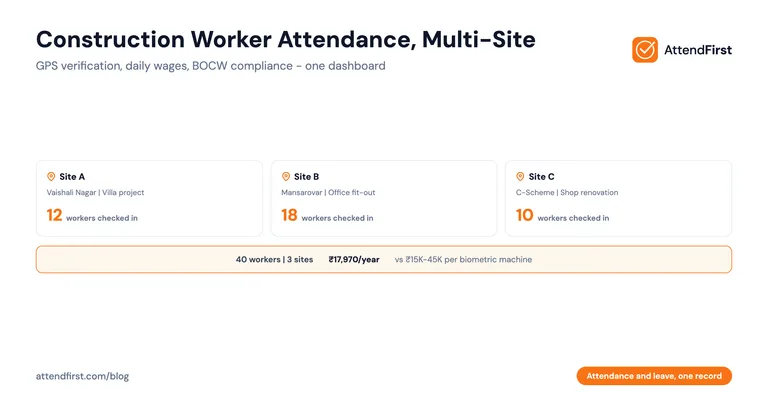
Construction Worker Attendance: Multi-Site Guide (India)
Payal focuses on leave management and compliance workflows for Indian businesses.
TL;DR: Construction attendance breaks because the owner is in one office while workers are at 3 sites. Registers at each site get manipulated. Daily wage workers need proof of days worked to get paid correctly.
- GPS check-in verifies which site each worker showed up at
- Selfie prevents buddy punching on daily wage payroll
- Handles both permanent staff and daily wage workers in one tool
You run a 40-worker construction firm in Jaipur. You have 3 active sites today: a villa in Vaishali Nagar, an office fit-out in Mansarovar, and a shop renovation near C-Scheme. You are in your office coordinating material purchases. Your site supervisors are each running one site. The attendance registers are with the supervisors. You have no idea right now how many workers showed up at the Mansarovar site today. By the time you find out at 8 PM, you can’t verify it anyway.
This is the construction attendance problem in one paragraph. The owner cannot physically be at 3 sites. The supervisors can be trusted, or not. The workers know the system. Daily wage workers get paid based on what the register says. The register says whatever someone wrote. Here is what breaks, and how field-experienced SMBs fix it without installing biometric machines at every building site.
Quick comparison: construction attendance methods
| Method | Verifies Site Location? | Works for Daily Wage Workers? | Cost for 40 Workers |
|---|---|---|---|
| Register at each site | No | Yes (with trust) | ₹500 + disputes |
| Supervisor phone call/WhatsApp | No | Manual | Free + pain |
| Biometric machine per site | Partial | Yes (if enrolled) | ₹15,000-45,000 + power issues |
| GPS + selfie app | Yes | Yes | ₹17,970/year |
The construction site attendance problem
Construction SMBs face specific attendance challenges: multi-site, daily wage, rain/dust, crew rotations.
The owner is never at the site
A 40-worker firm often has 3-5 active sites at any time. The owner is in an office or moving between sites. Workers are where the work is. The register is with the supervisor. Trust is the only thing connecting owner to worker attendance. Trust is not a system.
Daily wage workers
A chunk of construction workers are paid daily at ₹400-700 per day depending on skill. Their payment depends entirely on the attendance record. If the register says 22 days, they get paid for 22 days. If the register says 20 days, they get paid for 20 days. The worker has zero proof either way.
This creates two problems: workers not trusting the owner, and owners over-paying for days workers were absent.
Buddy marking and ghost workers
At a construction site, a supervisor might mark attendance for workers who never showed up: friends, relatives, or fake names. This is called “ghost worker” fraud. In some cases, it costs construction SMBs 5-15% of their monthly wage bill.
Registers cannot prevent this. Biometric machines help but cost money per site and don’t scale to remote/temporary sites.
Sites that change every week
Construction sites are temporary. One site closes, another opens. Today’s active site list is not tomorrow’s. A firm running 3 sites this month might run 5 different sites next month. Attendance tools that require fixed physical installation (biometric machines) don’t adapt.
No infrastructure at site
A half-built villa has no electricity. No Wi-Fi. No biometric machine. Sometimes no reliable 4G. Attendance has to work with whatever the worker has in his pocket. Usually a basic Android phone.
Multiple contractors and subcontractors
A medium construction firm often has its own workers plus contract workers from 2-3 subcontractors on the same site. All need attendance tracking, but they belong to different payroll systems. The owner needs one view across all of them.
Overtime and wage disputes
Construction work often runs 10-12 hours during monsoon-driven rushes. Workers expect overtime. Registers don’t track overtime accurately. Disputes happen at month-end.
Why registers fall apart on construction sites
The register is still the default for 80%+ of construction SMBs in India. Here is exactly why it breaks.
Illegible entries
Sites are dusty, wet, or under the sun. Pens run out. Handwriting is rough. At month-end, the owner squints at entries and guesses.
The Friday fill-in
Some supervisors fill the register for the whole week on Friday. One worker got sick on Tuesday? Still marked present. Another worker left early? Still marked full day. The register loses all connection to reality.
No real-time visibility
Owner calls the supervisor at 10 AM. “How many workers at Site 2 today?” Supervisor guesses, “22 I think.” Actual count was 18. Owner bases material purchases on 22. Overbuys. Money lost.
Wage disputes and impossible audits
A wage dispute goes to a labour inspector. The register is the only evidence. If it looks tampered, you lose. And handwritten registers almost always look tampered when there are corrections.
Ghost workers are invisible
If a supervisor marks a friend present who wasn’t there, the owner has no way to catch it. Over 6 months, one fake worker at ₹500/day = ₹78,000 lost (based on 26 working days/month x ₹500 x 6).
Registers get destroyed
A register left at a site during rain gets destroyed. A register in a supervisor’s bag gets misplaced. Month-end comes, there is no data. Workers remember what they want to remember. Disputes follow.
GPS and selfie check-in for construction sites
The daily flow
- Worker arrives at the villa site in Vaishali Nagar at 8 AM
- Opens the check-in link on his phone (no app to install)
- Taps “Check In”. App captures GPS coordinates and a selfie
- The system verifies: “Worker X, present at Villa Vaishali, 8:02 AM”
- The owner sees this on his dashboard in the office, in real time
- Worker leaves for lunch at 1 PM, taps “Break Out” (optional)
- Returns at 2 PM, taps “Break In”
- End of day at 6 PM, taps “Check Out”
- Total hours worked: 9 hours (10 with lunch, minus 1 hour break)
The owner’s dashboard shows all 3 sites simultaneously. “Villa Vaishali: 14 present. Mansarovar Office: 12 present. C-Scheme Shop: 8 present. Total: 34 of 40 workers.” Six workers are missing. Owner calls supervisors to investigate.
Why GPS matters
Without GPS, a supervisor could mark workers present at Villa Vaishali who are at Mansarovar Office. With GPS, each check-in is tied to coordinates. You configure geofences for each site (100-200 meter radius). Check-ins outside the geofence are flagged. (For the small-business angle on GPS attendance, see GPS attendance app for small business.)
Why selfie matters
Without selfie, a worker could hand his phone to a colleague who checks in for him. With selfie, the app captures the face. If the selfie doesn’t look like the worker’s registered face, you catch buddy punching. (See biometric vs selfie attendance for why selfies beat fingerprint scanners on construction sites where calloused hands fail biometric readers.)
Works with any Android phone
Construction workers typically have basic Android phones in the ₹5,000-8,000 range. GPS + selfie check-in works on any Android phone with a front camera. No special app, no high-end device.
Works offline at sites with poor signal
Good attendance tools support offline check-in. The worker taps check-in, the app captures GPS + selfie locally. When signal returns (often when the worker moves or the signal reconnects), the data syncs. No check-ins are lost.
Managing daily wage workers
Daily wage is the dominant payment model for Indian construction. Here is how to handle it cleanly.
What you need to track
- Full name and phone number
- Skill level (mason, helper, carpenter, electrician, painter, supervisor)
- Daily wage rate (varies by skill)
- Days worked (from check-ins)
- Half-day or full-day (based on hours)
- Overtime hours (beyond 8-9 hours)
- Advance payments given during the month
- Net wage due at month-end
Using the tool for daily wage payroll
- Each worker is added with skill and daily wage rate
- GPS + selfie check-in captures days worked
- System generates a monthly report: days worked x daily rate = gross wage
- You subtract advances and pay the balance
- Worker gets the same data. They can see their own “days worked” count in the app
This ends the “you said 22, I worked 25” arguments. Both sides see the same data. (Also see our daily attendance guide for Indian SMBs for the same flow applied to permanent staff.)
Advance payments
Construction workers often take weekly advances of ₹500-2,000 against their wages. You can maintain this separately in Excel or a simple note, and subtract at month-end from the gross wage the attendance tool gives you.
Handling workers who don’t show up
If a daily wage worker doesn’t show up, there is no check-in. The dashboard shows him as “missing” for that day. No payment for that day. Clean and fair.
Handling half-day work
If a worker arrives at 1 PM (half the day), the tool can mark him for half-day. Daily wage x 0.5. Most tools compute this based on hours worked. If actual working time is less than 5 hours, it is a half-day.
Put attendance and leave in one record → GPS + selfie attendance, daily wage tracking, multi-site dashboard, built for Indian construction SMBs. Start free
Handling overtime and wage disputes
The Indian legal position
Under the OSH Code 2020 (which replaced the Factories Act 1948 in November 2025) and most state Shops & Establishments Acts, overtime is paid at twice the normal wage rate for hours beyond the daily limit (8 under the Code, 9 under most state Acts) or 48 per week. The construction-specific rules that used to sit in the Building and Other Construction Workers (Regulation of Employment and Conditions of Service) Act 1996 (BOCW) now sit in the same Code.
What an attendance tool does
- Captures exact check-in and check-out time
- Calculates total hours worked per day
- Flags days where hours exceeded your configured daily limit (8 or 9)
- Calculates overtime hours per worker per month
- Exports this to Excel so you can compute overtime wage
Sample calculation
Worker: Ramu, mason, daily wage ₹600 (= ₹75/hour for 8 hours)
- Monday: 8 AM - 6 PM = 10 hours (8 normal + 2 overtime)
- Overtime wage: 2 hours x ₹75 x 2 (double rate) = ₹300
- Total for Monday: ₹600 + ₹300 = ₹900
Repeat for each day. At month-end, the tool gives you hours. You compute wages. No guesswork. No dispute.
Dispute resolution
When a wage dispute comes up, pull up the attendance data for that worker. Show the timestamps. Show the GPS coordinates. Show the selfies. Most disputes end immediately. The few that escalate have clean evidence for labour inspection or court.
Compliance with the construction worker rules
The BOCW Act 1996 applied to construction establishments employing 10+ workers on any day in the preceding 12 months. Since 21 November 2025 those duties sit under the Occupational Safety, Health and Working Conditions Code 2020, which absorbed the Act. Compliance requires:
Registration
The establishment must register with the state welfare board. A cess of 1% of construction cost goes to the Building and Other Construction Workers Welfare Cess fund.
Muster roll (attendance register)
Under the BOCW Rules, you must maintain a muster roll showing daily attendance of every worker. Paper muster rolls are the default, but digital records are acceptable if they satisfy the same requirements. If you need the paper format today, download the free muster roll template (Excel + PDF) - it covers the columns inspectors expect.
Who takes the attendance, and who answers for it
On the ground, the site supervisor marks the roll. Legally, the chain is longer: the contractor is responsible for maintaining the muster roll for workers they engage, and the principal employer is responsible for verifying that the contractor maintains it. When an inspector finds a bad roll, both get questions. This split is why owners like app-based check-in - the daily attendance record builds itself from worker check-ins, and neither the supervisor’s memory nor the contractor’s pen is in the loop.
Wage register
You must also maintain a wage register showing days worked, wages due, advances given, and net wages paid. This ties directly to the attendance data.
Safety records
BOCW rules require records of safety training, PPE issued, and accident records. Not directly attendance, but often combined with attendance records for inspection purposes.
OSH Code (where applicable)
If your site is registered as a factory (unusual for construction but possible for large prefab operations), additional record-keeping rules apply: muster roll, overtime register, leave register. These sit under the Occupational Safety, Health and Working Conditions Code 2020, which absorbed the Factories Act 1948, the Contract Labour Act 1970, and the BOCW Act 1996 when the labour codes took effect on 21 November 2025.
Minimum wage compliance
State governments set minimum wages under the Code on Wages 2019 (which replaced the Minimum Wages Act 1948 in November 2025) for construction workers by skill category. You must pay at least the minimum. Attendance x minimum wage = minimum monthly wage. If your actual payment is lower, you are non-compliant.
Digital records and audits
Digital attendance records are accepted by most labour inspections in India as long as they include:
- Worker name and ID
- Date and shift
- Check-in and check-out time
- Signature or photo verification
- Supervisor’s note for exceptions
A GPS + selfie attendance tool produces all of this. Export to Excel for inspection. Much cleaner than a handwritten register with scratched-out entries.
Real scenario: 40-worker Jaipur construction firm
A construction firm in Jaipur, 40 workers total:
- 8 permanent staff (supervisors, office, storekeeper)
- 32 daily wage workers (masons, helpers, carpenters, painters, electricians)
- 3 active sites at any time, changing every 2-4 months
Before: the old system
- Register at each site, kept by the supervisor
- Owner compiled registers weekly, cross-checked with supervisor verbally
- Daily wage calculations on Excel, based on whatever the register said
- 4-5 wage disputes per month, mostly over “you said X, I worked Y”
- One fake worker detected after 4 months (supervisor had been marking his nephew who never came), estimated loss ₹40,000+
- Monthly wage processing: 6-8 hours
The breaking point
In October 2025, one of the sites had a labour inspection. The muster roll had unclear entries. The inspector asked for 3 months of attendance and wage records. Half the entries were illegible. The inspector issued a warning and asked for improved record-keeping. The owner decided to switch.
The switch
The owner moved to a GPS + selfie attendance tool in November. Setup took 2 hours:
- 3 active site locations geofenced (radius 150 meters each)
- 40 workers added with skill, daily wage rate, and department
- 2 site supervisors assigned as “site managers” with approval rights
- Leave types configured (PL, SL, CL for permanent staff; daily wage workers use “absent” for days not worked)
- Overtime threshold set at 9 hours
- Training session at each site, 30 minutes each
After: 3 months later
- Wage disputes: 1 in 3 months (resolved in 5 minutes using dashboard data)
- Fake worker incidents: 0
- Monthly wage processing: 1.5 hours (down from 6-8)
- Labour inspection (February 2026): passed cleanly with digital records printed from the tool
- Annual cost: ₹17,970 (₹3,000 for the first 10, then 30 x ₹499 = ₹17,970/year)
- Compared to estimated Rs.40,000+ fake worker loss: paid for itself 2x over in 4 months
Real-time visibility was the biggest win. The owner could see at 9 AM how many workers were at each site without calling the supervisors. Material planning improved. Decisions got faster.
Setup checklist for construction SMBs
Map your active sites (10 min)
List every active site with:
- Site name (e.g., “Villa Vaishali”, “Mansarovar Office”)
- GPS coordinates (Google Maps link)
- Expected number of workers
- Site supervisor name
List your workers (15 min)
For each worker:
- Full name and phone number
- Skill category (mason, helper, carpenter, electrician, painter, supervisor, office)
- Daily wage rate (for daily wage) or monthly salary (for permanent)
- Assigned site (can change weekly)
Configure shifts and overtime (5 min)
- Regular shift hours (usually 8 AM - 5 PM with 1-hour lunch = 8 hours)
- Overtime threshold (hours beyond 8 or 9 per day)
- Overtime rate (typically 2x normal wage per legal requirement)
Assign site supervisors as managers (5 min)
Each site supervisor should have manager access to:
- Approve leave requests from permanent staff
- Add manual attendance entries for workers who forgot phones
- Review site-specific dashboard
Geofence each site (5 min)
Configure a geofence around each site (100-200 meters). Check-ins outside the geofence are flagged for review.
Train workers (30 min per site)
At each site, gather the workers for a short training:
- Show the check-in link (share via WhatsApp)
- How to take the selfie and check in
- How to check out at end of day
- What happens if phone has no signal (offline mode)
Monitor the first week
Every morning in the first week, review the dashboard. Catch any missing check-ins. Help confused workers. By week 2, the flow is normal.
Monthly review
At month-end, export attendance to Excel. Cross-reference with advance payments. Calculate net wages. Pay workers. Keep the export file for compliance records.
Common questions from construction SMB owners
My workers change phones often. How do I handle this?
Each worker is identified by phone number in the system. When a worker changes phones, update their phone number in the tool (takes 10 seconds). All their past attendance history is preserved. They start checking in from the new number.
What about migrant workers without smartphones?
Some migrant workers have basic feature phones. Options: (1) The site supervisor adds manual attendance for them daily. The tool logs this as a manual entry so there is an audit trail. (2) Place a shared tablet at the site for these workers to check in, (3) Use QR code check-in with a printed code at the site gate scanned by a supervisor’s phone.
How do I handle workers who move between sites during the day?
Each check-in is tied to a site. If a worker is at Site A in the morning and Site B in the afternoon, they check out from Site A and check in at Site B. The tool records both, with GPS coordinates for each.
What about contract workers from a subcontractor?
Add them in the tool just like direct workers. Mark them as “contract” or assign to a separate department. At month-end, you get their attendance data to share with the subcontractor for payment calculation.
Is this cheaper than registers?
For any construction SMB with 15+ workers, yes, significantly. Registers cost Rs.500 in notebooks plus an estimated 4-8 hours of owner time per month plus disputes. Attendance tool costs ₹499/worker/year above 10 (free up to 3, ₹3,000 for 4-10) plus zero owner time for reconciliation. The fake worker detection alone often pays for itself.
What if a site has zero signal?
Offline check-in support: the worker taps check-in, the app captures data locally. When the worker moves to an area with signal (even a few minutes later), the data syncs. GPS coordinates are still captured accurately. No data is lost.
Can I use this for just one site first?
Yes. Start with your largest or most problematic site. Run it for a month. Once you see it working, roll out to other sites. AttendFirst is free for up to 3 workers, so a pilot on a small site is zero cost.
What about BOCW compliance: will inspectors accept digital records?
Yes. Most state labour departments accept digital attendance records as long as they contain required fields (worker identity, date, hours, signature/photo). Digital records are cleaner for inspection than registers because entries are timestamped and cannot be altered.
What to look for in a construction attendance tool
| Must-Have | Why It Matters |
|---|---|
| GPS with site geofencing | Verifies worker at the correct site |
| Selfie verification | Prevents buddy punching and ghost workers |
| Multi-site dashboard | Owner sees all sites from one screen |
| Offline check-in support | Remote sites have poor signal |
| Daily wage worker support | Most construction workers are daily wage |
| Overtime calculation | Legal requirement, avoids disputes |
| Manual entry option for supervisors | For workers without smartphones or exceptions |
| Add/remove workers in seconds | High churn, temporary workers |
| Monthly Excel export | For wage calculation and compliance records |
| Works on basic Android phones | Workers have entry-level devices |
| Free plan for small sites | Pilot before rolling out to all sites |
Stop guessing who showed up at which site today. Put attendance and leave in one record → GPS + selfie check-in, multi-site dashboard, daily wage tracking, overtime calculation, built for Indian construction SMBs on paper muster rolls. One tool for permanent staff and daily wage workers. No biometric machines at every site.
Payal Sharma’s field-operations work takes her to construction sites in Jaipur and the surrounding region. This post comes from time spent with contractors running 3-5 active sites, verifying daily wage rolls against paper musters, and investigating ghost-worker fraud before it gets out of hand.
Frequently asked questions
How do I track attendance across multiple construction sites?
Use a GPS + selfie app with site geofencing. Each check-in captures GPS coordinates tied to the site, so a worker at Site A cannot be marked present at Site B. The owner sees all sites on one dashboard in real time without calling supervisors.
What is the cheapest attendance method for a 40-worker construction firm in India?
A GPS + selfie attendance app. For 40 workers, AttendFirst costs about ₹17,970/year (free up to 3, ₹3,000/year for 4-10, then ₹499/year for each worker above 10). A biometric machine at each site costs Rs.15,000-45,000 per site plus power and AMC. Registers look free but lose Rs.40,000+ to ghost-worker fraud within months.
Will digital attendance records satisfy a construction labour inspection?
Yes. Most state labour departments accept digital attendance records if they show worker identity, date, check-in and check-out times, and photo or signature verification. Digital records are often cleaner than handwritten muster rolls because entries are timestamped and tamper-evident.
What about workers at remote sites with poor mobile signal?
Good attendance apps support offline check-in: the worker taps check-in, the app captures GPS and selfie locally, and data syncs when signal returns. GPS coordinates are still captured accurately. No check-ins are lost.
How do I handle daily wage workers without smartphones?
Three options: (1) the site supervisor adds manual attendance entries daily with an audit trail, (2) a shared tablet at the site gate lets workers check in, or (3) QR code check-in with a printed code at the gate scanned by the supervisor.
How do I calculate overtime wages for construction workers?
Under the OSH Code 2020 and most state rules, overtime beyond the daily limit (8 hours under the Code, 9 under most state Acts) is paid at twice the normal wage rate. A GPS attendance app captures exact check-in and check-out timestamps, calculates total hours, and flags overtime days. Export to Excel for wage calculation.
Who is responsible for taking daily attendance of labour on a construction site?
The site supervisor or the contractor's authorised representative marks daily attendance, but legal responsibility sits higher: the contractor must maintain the muster roll for their workers, and the principal employer must ensure the contractor actually does it. In practice this means the supervisor marks the roll daily and the owner or principal employer verifies it - which is exactly the loop that GPS + selfie check-in automates.
Get attendance tips for Indian businesses
One practical guide per week. No spam.
Put attendance and leave in one record
Indian holidays and weekly offs come already loaded. Setup takes 5 minutes, and no payment is required to start.