Hospitality Attendance: Restaurants, Hotels & Cafes India
Payal focuses on leave management and compliance workflows for Indian businesses.
TL;DR: Hospitality attendance is harder than retail or office because of split shifts, 24-hour operations, multi-location rosters, and 40-60% annual turnover.
- Registers break at 2 AM when the night shift changes
- GPS + selfie handles split shifts without hardware at every entry point
- Free for 3 employees, ₹3,000/year for 4-10, ₹499/year/employee above 10. Tracks shifts, leave, and tips in one tool
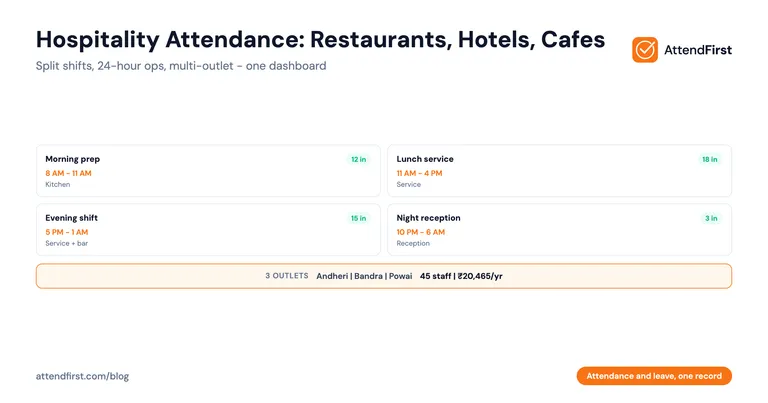
You run a 3-outlet restaurant chain in Mumbai (Andheri, Bandra, and Powai) with 45 staff across kitchens, service, delivery, and cleaning. Morning shift starts at 8 AM for breakfast prep. Lunch service runs 11 AM to 4 PM. Evening shift comes in at 5 PM and goes till 1 AM. Delivery riders work split shifts across all 3 outlets. Your attendance register is a notebook at the cash counter of each outlet. The cashier is supposed to mark attendance. The cashier changes every 2 months. You have no idea who actually showed up last Friday.
Hospitality has attendance challenges most other verticals don’t face. Retail has multi-location. Manufacturing has multi-shift. Hospitality has both, plus 24-hour operations, plus high staff turnover. Here is what actually works.
Quick Comparison: Hospitality Attendance Methods
| Method | Works for Split Shifts? | Handles 24-Hour Ops? | Tracks Tips/Incentives? | Cost for 45 Staff (Yearly) |
|---|---|---|---|---|
| Register | Messy | No (shift change chaos) | No | ₹500 + your pain |
| Biometric at entrance | Yes if pre-configured | Breaks on night shift | No | ₹15,000-45,000 + AMC |
| WhatsApp selfies | Manual scroll | Fails | No | Free + pain |
| GPS + selfie app | Yes | Yes | Yes (with notes) | ₹20,465/year |
Why Hospitality Is Different from Retail and Offices
Split Shifts Are the Norm
A service staff at a hotel restaurant might work 11 AM to 3 PM, then again 7 PM to 11 PM. That is one working day with two check-ins and two check-outs. Most attendance tools (and all registers) treat this as two separate days or get confused. The employee gets frustrated. The owner miscounts hours at month-end.
24-Hour Operations Break the Register
A hotel reception runs 24 hours. Night shift staff come in at 10 PM and leave at 6 AM. The attendance register lives at the front desk. Night shift staff mark themselves. Morning shift checks the register at 6 AM and often finds entries missing, unclear, or signed in bulk at 5:59 AM.
Multi-Location With Shared Staff
A restaurant chain with 3 outlets often shares delivery riders, cashiers during weekends, or chefs covering for sickness. Registers don’t handle “worker X was at Outlet 1 in morning and Outlet 2 in evening.” You get duplicate entries or missed days.
High Staff Turnover (40-60%)
Hospitality in India sees 40-60% annual turnover among frontline staff. Every month, you add 2-3 new staff and remove 2-3. Biometric machines need physical enrolment every time. Registers need fresh entries. Both are painful at this churn rate.
Tipping and Incentive Tracking
Service staff earn tips and incentives on top of salary. Some restaurants pool tips and distribute by hours worked. Accurate hours worked matters for fair distribution. Registers give you “was present”, not “worked 8.5 hours on Friday with a 30-minute break.”
Shops & Establishments Act for 24-Hour Operations
Indian state Shops & Establishments Acts generally cap shift length (usually 9 hours/day, 48 hours/week) and require weekly off. For 24-hour operations, you need to rotate staff so nobody exceeds these limits. Without reliable attendance data, compliance is a guess.
Outdoor Staff: Delivery Riders and Valet
Delivery riders at a restaurant chain don’t check in at one place. They start at the outlet, ride across the city, come back. Valet staff at a hotel work in the porch, not the lobby. Neither shows up at a fingerprint machine in the back office.
The Attendance Register Problem at 2 AM
A 50-staff hotel in Bangalore had this exact problem until 4 months ago. The front desk register was the attendance system for all shifts. Night shift staff (3 people) came in at 10 PM. They marked themselves in before starting. The morning shift (4 people) came in at 6 AM and marked themselves.
On an average week, about 10% of entries were wrong: missing, signed in bulk, or signed with wrong timings. Over a month, that meant 2-3 salary disputes. One housekeeping staff member claimed she had worked Saturday night when she hadn’t. The front desk register had her entry (signed by a colleague). No way to prove otherwise.
The owner moved to GPS + selfie check-in for all staff. In the first month:
- Zero disputes
- All night shift check-ins had timestamps and selfies
- Multi-shift staff had clear in/out for each shift segment
- Monthly roster and salary processing took 30 minutes instead of 3 hours
No hardware was installed. No biometric machine. Just a web link and a one-hour training session.
GPS + Selfie for Restaurant Outdoor Staff
Delivery riders and valet staff are where hospitality attendance falls apart. Here is what GPS + selfie check-in does differently.
How It Works for a Delivery Rider
- Rider arrives at the restaurant at 10 AM, opens the check-in link on their phone
- Taps “Check In”. App captures a selfie and GPS coordinates (confirming they are at the outlet)
- Rider does deliveries across the city for 4 hours
- Rider returns to the restaurant, taps “Check Out” at 2 PM. Another selfie and GPS
- Rider takes a 2-hour break
- Comes back at 4 PM for second shift, taps “Check In” again (if your tool supports multiple shifts per day)
- Finishes at 9 PM, taps “Check Out”
The dashboard shows 2 shift segments for that day: 10 AM-2 PM and 4 PM-9 PM. Total hours worked: 9. This is what registers and biometric machines cannot do.
How It Works for Valet Staff at a Hotel
Valet stands in the hotel porch. Opens the link on their phone at shift start. Selfie + GPS (hotel entrance coordinates). Works the shift. Taps check-out at end. No fingerprint machine needed. No register to sign. The manager sees “Ramesh on duty at porch, checked in 7:58 AM” on the dashboard.
Why GPS Matters for Multi-Outlet Chains
A delivery rider or a cover chef who works across 3 outlets should check in at the correct outlet every time. GPS coordinates prove which location. If a rider claims to have been at Outlet 2 but GPS says Outlet 1, the data is there. This prevents the “I was there” arguments that plague multi-outlet hospitality businesses.
Shift Management for Hotels and 24-Hour Operations
Hotels and 24-hour restaurants need shift management: rosters, not just attendance.
What a Shift Roster Should Do
- Let you assign each staff member to a specific shift (morning, afternoon, night)
- Rotate shifts weekly for fairness (no one stuck on permanent night shift)
- Flag check-ins outside expected shift windows as “late” or “early”
- Calculate overtime when check-out is beyond shift end
- Handle shift swaps between employees with approval
- Show the full roster for the week on one screen
Typical Shift Patterns in Indian Hospitality
- Full-day shift: 9 hours with a 1-hour break (kitchen, service staff during lunch service)
- Split shift: 11 AM to 3 PM + 7 PM to 11 PM (service staff in hotel restaurants)
- Morning shift: 6 AM to 2 PM (breakfast prep, front desk)
- Evening shift: 2 PM to 10 PM (dinner service, front desk)
- Night shift: 10 PM to 6 AM (front desk, security, housekeeping prep)
- Weekend shifts: different pattern than weekdays (more service staff)
A good attendance tool handles all of these. A register handles none.
Overtime and Wage Calculation
Under most state Shops & Establishments Acts and the OSH Code 2020 (which replaced the Factories Act 1948 in November 2025), overtime is paid at double the normal wage rate. For hospitality staff working 10-12 hour days during peak season, this adds up fast. Tracking overtime manually from a register is guesswork. You need actual check-in/check-out timestamps.
Put attendance and leave in one record → Split shifts, multi-location, GPS + selfie, overtime tracking, built for Indian hospitality. Start free
Common Compliance Issues
Hospitality compliance is not optional. Here are the top issues SMB owners face, and how proper attendance tracking helps.
Shops & Establishments Act: Weekly Off
Almost all state Shops & Establishments Acts require one weekly off. For 24-hour operations, this means rotating staff. Without attendance data showing who took off when, you cannot prove compliance during an inspection.
Shops & Establishments Act: Maximum Hours
Most state Acts cap daily hours at 9 and weekly hours at 48 (with overtime allowed beyond that, paid at 2x). For peak season, staff often exceed these limits. You need attendance data to calculate overtime correctly and stay compliant.
ESI and EPF Registration
Establishments with 10+ employees earning under ₹21,000/month must register under ESI. 20+ employees triggers EPF. Both require accurate records of days worked. Attendance register handwriting does not hold up to inspection.
Contract labour
If you hire delivery riders through a contractor (common in food delivery), the contract labour rules in the OSH Code 2020 apply once a contractor engages 50+ workers. The Code replaced the Contract Labour (Regulation & Abolition) Act 1970, which used a 20-worker threshold, in November 2025. Accurate attendance records for contract workers are required either way.
State Minimum Wages
Each state sets minimum wages for different skill levels in hospitality. You must pay at least the minimum for days worked. Attendance data is the proof of days worked.
Real Scenario: 50-Staff Bangalore Hotel
A mid-sized hotel in Indiranagar, Bangalore:
- 50 staff: 15 front desk + concierge, 12 housekeeping, 8 kitchen, 8 service, 4 maintenance, 3 security
- 24-hour operations across all departments
- 3 shifts (morning 6-2, afternoon 2-10, night 10-6) for most departments
- Front desk, housekeeping, and security rotate nightly
- Kitchen and service work standard split shifts during meal service
Before: The Old System
- Register at front desk for all staff
- Manager compiled it every morning into an Excel
- 10-15% error rate due to unclear entries and missed shifts
- Salary processing: 4 hours a month
- 2-3 disputes per month about leave or shift hours
The Switch
The owner moved to a GPS + selfie attendance tool. Setup took 2 hours:
- 50 employees added with phone, department, and shift assignment
- Hotel location geofenced (GPS check-in requires being at the hotel)
- 3 shift patterns created (morning, afternoon, night)
- Leave types configured (PL 12, SL 12, CL 7)
- Overtime calculation enabled (beyond 9 hours/day)
- Manager roles assigned per department
After: 3 Months Later
- Attendance error rate: under 1% (only occasional forgotten check-ins, resolved by manager manual entry)
- Salary processing: 40 minutes a month
- Disputes: 1 in 3 months (resolved within 10 minutes using audit trail)
- Overtime calculation: automatic
- Annual cost: ₹3,000 for the first 10, then 40 x ₹499 = ₹22,960/year
- Compared to biometric machine option: one-time Rs.15,000 + Rs.5,000 AMC + manual leave tracking in Excel
Night shift staff saw the biggest improvement. Previously, nobody knew if the 3 AM shift change happened on time. Now the owner sees timestamps on his phone every morning.
Setup Checklist for Hospitality Businesses
If you run a restaurant, hotel, cafe, or catering business, here is the 60-minute setup.
Step 1: Map Your Locations (5 min)
List every location where staff work: outlets, kitchens, delivery hubs, hotel departments. Get each location’s GPS coordinates (paste the Google Maps link).
Step 2: Map Your Shifts (10 min)
List every shift pattern: morning, afternoon, night, split shifts, weekend variants. Note start and end times. For split shifts, note the break window.
Step 3: List Your Staff by Department (10 min)
Kitchen, service, housekeeping, front desk, security, delivery, cleaning. Add each staff member with name, phone number, department, and primary shift. Mark which ones work multiple locations.
Step 4: Configure Leave Types (5 min)
PL, SL, CL with quotas based on your state Shops & Establishments Act. See our sick leave vs casual leave guide for quotas.
Step 5: Assign Managers (5 min)
For each department, assign a manager who will approve leave requests. For small hotels, the owner may be the only approver. That is fine.
Step 6: Train Staff (20 min)
One 20-minute session per shift is enough. Show:
- How to open the check-in link
- How to take the selfie
- How to check out at shift end
- How to request leave (pick PL/SL/CL, dates, reason)
- How to check remaining leave balance
Step 7: Monitor Week 1 (5 min/day)
Every morning in week 1, scan the dashboard. Check for missed check-ins. Help anyone struggling with the app. By end of week 1, most staff will be fluent.
Common Questions from Hospitality Owners
My kitchen staff don’t speak English. Can they use the app?
Most attendance apps support Hindi, Tamil, Marathi, and other Indian languages. The check-in flow is just 2 taps: “Check In” button and selfie. Even staff with low literacy can handle it. For anyone who struggles, the manager can add manual entries.
What about split shifts? Does the app count the break as working time?
No. A properly configured split shift attendance tool counts only the time between check-in and check-out for each shift segment. A 11 AM to 3 PM + 7 PM to 11 PM split = 8 hours worked, not 12. The 4-hour break is excluded automatically.
How do I handle staff who forget their phone at home?
The manager can add a manual attendance entry for them. The system logs that it was a manual entry (not a self check-in) so you have an audit trail. Don’t make exceptions too often. It defeats the verification.
What about night shift when staff come in at 10 PM and leave at 6 AM the next day?
The tool should handle night shifts that cross midnight. Check-in is at 10 PM on Monday, check-out is at 6 AM on Tuesday. The total 8 hours are attributed to the correct shift (usually Monday’s night shift). Verify this during setup.
Can I track tips and incentives in the same tool?
Some attendance tools let you add notes or daily incentive fields. For structured tip pooling, you may need a separate spreadsheet that imports attendance hours from the tool. Export weekly attendance to Excel and compute tips per hour worked.
What if I have contract delivery riders?
Add them as regular employees in the tool. They check in and out like anyone else. At month-end, you have clear records for the contractor to verify hours worked and calculate payment.
Do I need separate devices for each outlet?
No. Each employee uses their own phone. There are no shared devices to buy, install, or maintain. This is the biggest cost advantage over biometric machines at each outlet.
What happens during a festival rush when I hire temporary staff?
Add them in 30 seconds each: name, phone, department, shift. They check in like permanent staff. When they leave, deactivate them in one tap. No fingerprint to enrol or delete.
What to Look For in a Hospitality Attendance Tool
| Must-Have | Why It Matters |
|---|---|
| Split shift support (multiple shifts/day) | Hospitality staff work split shifts daily |
| Night shift that crosses midnight | 24-hour operations span midnight |
| Multi-location with geofencing | Multi-outlet chains need location verification |
| GPS + selfie (no fingerprint) | Kitchen staff have wet/oily hands |
| Fast add/remove employees | 40-60% annual turnover in hospitality |
| Overtime calculation | Labour law compliance and fair wage |
| Leave management (PL/SL/CL) | Integrated with attendance, no Excel |
| Excel export for payroll | Your CA needs daily and monthly reports |
| Indian language support | Frontline staff often prefer Hindi/Tamil/Marathi |
| Works on personal phones | No company devices, no shared hardware |
| Free plan for small cafes | Test before committing |
Stop guessing who showed up for the night shift. Put attendance and leave in one record → Split shifts, multi-location, GPS + selfie, leave management, built for Indian restaurants, hotels, and cafes. No biometric machines. No registers. Just check-ins that hold up to inspection.
Payal Sharma’s field-operations work brings her into Mumbai restaurants, Bangalore hotels, and Jaipur cafes most months. This post is shaped by what she sees during late-night shift changes, split shifts for service staff, and monthly wage runs that have to account for tips, overtime, and split rosters all at once.
Frequently asked questions
How do I track attendance for hospitality staff with split shifts?
Use an attendance app that supports multiple check-ins per day. A service staff working 11 AM-3 PM and 7 PM-11 PM taps check-in and check-out for each segment. The app records 2 shift segments totalling 8 hours, excluding the 4-hour break.
What is the best attendance method for a restaurant with delivery riders?
GPS + selfie check-in. Riders check in at the restaurant location (GPS verifies), take a selfie (identity), and check out when their shift ends. Unlike biometric machines tied to a physical location, this works for field staff moving across the city.
Can an attendance app handle night shifts that cross midnight?
Yes. A properly configured attendance app records a check-in at 10 PM Monday and a check-out at 6 AM Tuesday as a single night shift of 8 hours, attributed to Monday's shift. Verify this during setup with a test night shift.
How do I stay compliant with Shops & Establishments Act for a 24-hour hotel?
Most state Acts cap daily hours at 9 and weekly at 48, require one weekly off, and require overtime at 2x the normal rate beyond the cap. Attendance data is the proof of hours worked and weekly offs taken. Digital records hold up better than handwritten registers during inspection.
Do I need a biometric machine at each outlet in a multi-outlet chain?
No. GPS + selfie check-in uses the employee's own phone and verifies location via geofencing. Each outlet is a separate geofenced location. There is no hardware to buy, install, or maintain. Cost scales with employees, not outlets.
How does this handle high staff turnover in hospitality?
Adding or removing a staff member takes 30 seconds - name, phone, department, shift. No fingerprint enrolment to schedule, no biometric device to reconfigure. For 40-60% annual turnover in hospitality, this is critical.
Get attendance tips for Indian businesses
One practical guide per week. No spam.
Put attendance and leave in one record
Indian holidays and weekly offs come already loaded. Setup takes 5 minutes, and no payment is required to start.